
User's Guide Digital Camera C530, C315, CD50





Table Of Contents
- Front cover
- Product features
- Table of contents
- 1Setting up your camera
- 2Taking pictures and videos
- 3Transferring and printing pictures
- Installing the software
- Transferring pictures with the USB cable
- Printing pictures
- Dock compatibility for your camera
- 4Doing more with your camera
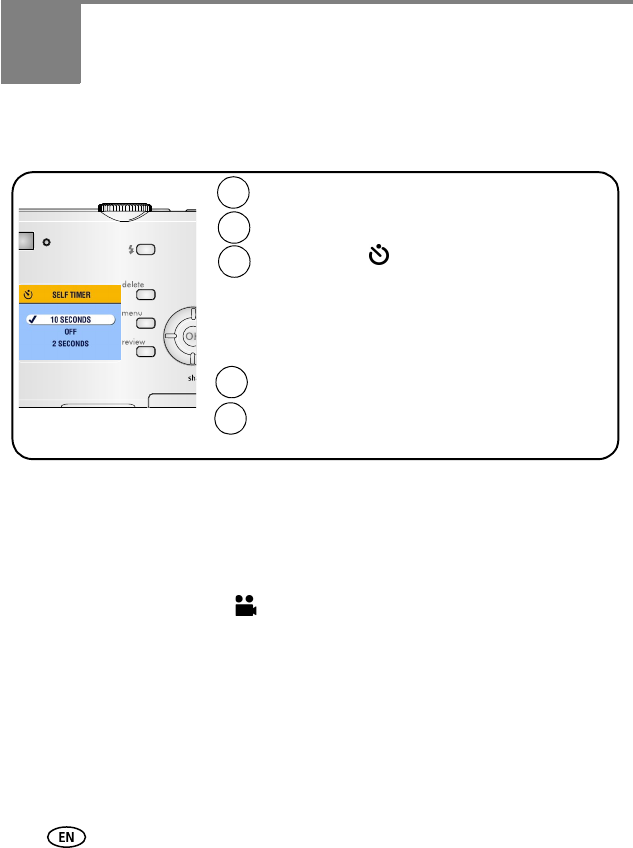
- Using the self-timer
- Running a slide show
- Copying pictures and videos
- Choosing a flash setting
- Changing picture-taking settings
- Customizing your camera
- Viewing picture/video information
- Pre-tagging for album names
- Sharing your pictures
- 5Troubleshooting
- 6Getting help
- 7Appendix
- Index
20 www.kodak.com/go/support
4 Doing more with your camera
Using the self-timer
NOTE:
The self timer cancels after you take the picture, record the video, or turn off the
camera.
Using the self timer for video
Use the same procedure as above, but:
■ Turn the Mode dial to video .
■ Press the Shutter button completely down.
NOTE: The video stops when you press the Shutter button or when no storage space remains.
Choose Self Timer .
In Auto mode, press the Menu button.
1
2
4
5
Place camera on a tripod or flat surface.
Compose the scene.
Press the Shutter button.
10-second delay (so you have time to get into the
scene)
2-second delay (for a steady, auto-shutter release on a
tripod)
3