
User's Guide Digital Camera C530, C315, CD50



Table Of Contents
- Front cover
- Product features
- Table of contents
- 1Setting up your camera
- 2Taking pictures and videos
- 3Transferring and printing pictures
- Installing the software
- Transferring pictures with the USB cable
- Printing pictures
- Dock compatibility for your camera
- 4Doing more with your camera
- Using the self-timer
- Running a slide show
- Copying pictures and videos
- Choosing a flash setting
- Changing picture-taking settings
- Customizing your camera
- Viewing picture/video information
- Pre-tagging for album names
- Sharing your pictures
- 5Troubleshooting
- 6Getting help
- 7Appendix
- Index
Troubleshooting
www.kodak.com/go/support
41
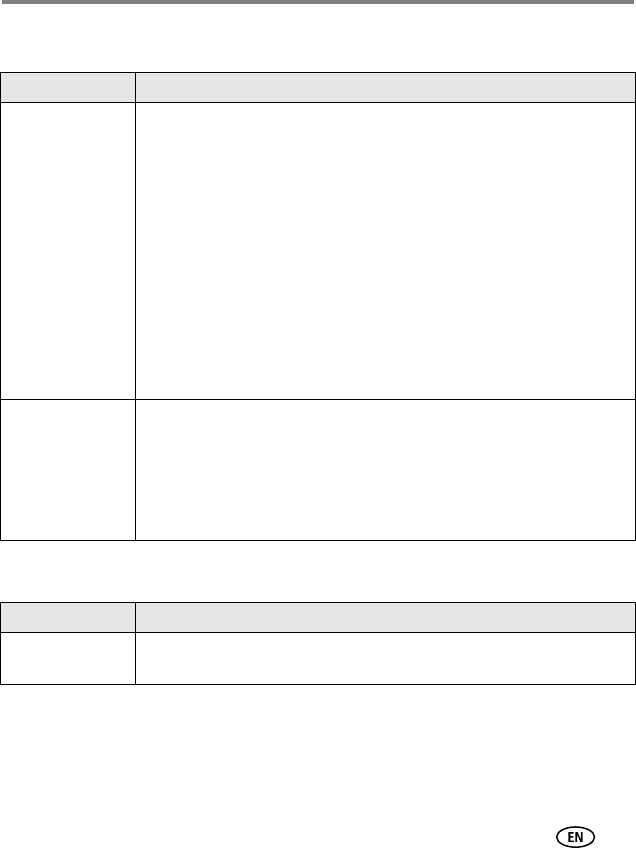
Camera/computer communications
LCD screen messages
If... Try one or more of the following
The computer does
not communicate
with the camera.
■ Visit www.kodak.com/go/camerasupport.
■ Turn on the camera (page 2).
■ Install new batteries (page 1) or charge rechargeable batteries.
■ See the Power Management section of the laptop user’s guide to
disable this feature.
■ Connect cable to camera and computer port (page 15).
■ Install the software (page 14).
■ Disconnect the USB cable. Close all open applications. Re-install the
software (page 14).
■ Disconnect camera from the computer. Close all software applications,
reconnect camera.
■ Close that software before starting the Kodak software.
Cannot transfer
pictures.
(The Add New
Hardware Wizard
cannot locate
drivers.)
■ Disconnect USB cable. (If using camera dock or printer dock,
disconnect cable and remove camera from dock). Close all open
applications. Re-install the software (
page 14).
■ Disconnect the USB cable. Close all open applications. Re-install the
software (
page 14).
If... Try one or more of the following
No images to
display
■ Change image storage location setting (page 26).