
User's Guide Digital Camera C530, C315, CD50




Table Of Contents
- Front cover
- Product features
- Table of contents
- 1Setting up your camera
- 2Taking pictures and videos
- 3Transferring and printing pictures
- Installing the software
- Transferring pictures with the USB cable
- Printing pictures
- Dock compatibility for your camera
- 4Doing more with your camera
- Using the self-timer
- Running a slide show
- Copying pictures and videos
- Choosing a flash setting
- Changing picture-taking settings
- Customizing your camera
- Viewing picture/video information
- Pre-tagging for album names
- Sharing your pictures
- 5Troubleshooting
- 6Getting help
- 7Appendix
- Index
28 www.kodak.com/go/support
Doing more with your camera
5 Press the Menu button to exit.
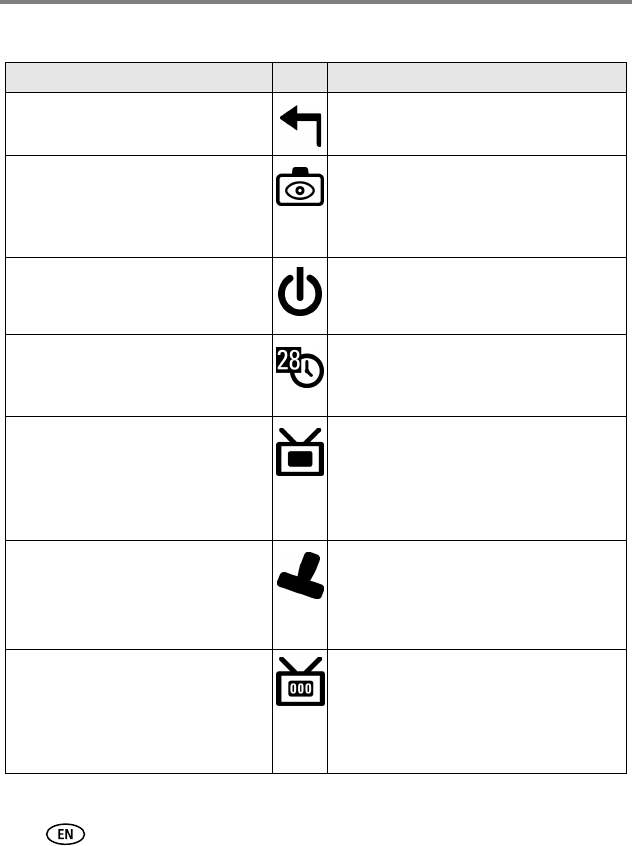
Setting Icon Options
Return
Return to previous menu.
Liveview
Change LCD screen setting so that it is
always on or always off (see page 7).
This setting remains until you change it.
On or Off.
Auto Power Off
Select when you would like the camera
to turn off.
3 minutes (default)
1, 3, 5, or 10 minutes
Date & Time
Set the date and time.
This setting remains until you change it.
See page 2.
Video Out
Choose the regional setting that lets
you connect the camera to a television
or external device (see page 22).
This setting remains until you change it.
NTSC (default)—used in most countries
except those in Europe and China. North
America and Japan use NTSC.
PAL—used in Europe and China.
Date Stamp
(Auto Mode)
Imprint the date on pictures.
This setting remains until you change it.
Turn the Date Stamp on or off, or change
the date stamp format.
Video Date Display
(Video mode)
Display capture date and time before
the video starts.
This setting remains until you change it.
Choose None, or choose a date and time
format.