
User's Guide Digital Camera C530, C315, CD50




Table Of Contents
- Front cover
- Product features
- Table of contents
- 1Setting up your camera
- 2Taking pictures and videos
- 3Transferring and printing pictures
- Installing the software
- Transferring pictures with the USB cable
- Printing pictures
- Dock compatibility for your camera
- 4Doing more with your camera
- Using the self-timer
- Running a slide show
- Copying pictures and videos
- Choosing a flash setting
- Changing picture-taking settings
- Customizing your camera
- Viewing picture/video information
- Pre-tagging for album names
- Sharing your pictures
- 5Troubleshooting
- 6Getting help
- 7Appendix
- Index
Doing more with your camera
www.kodak.com/go/support
27
Customizing your camera
Use Setup to customize your camera settings.
1 In any mode, press the Menu button.
2 Press to highlight Setup , then press the OK button.
3 Press to highlight the setting you wish to change, then press the OK button.
4 Choose an option, then press the OK button.
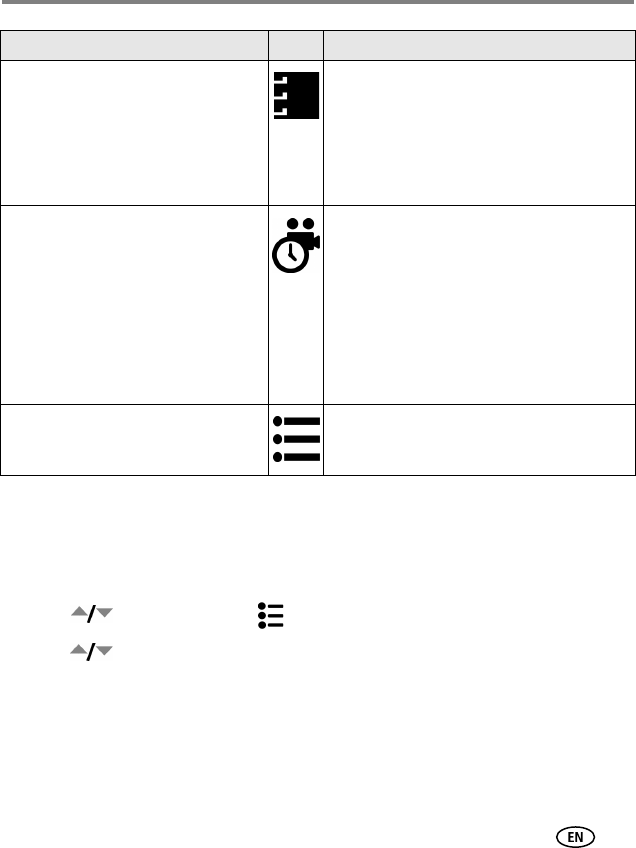
Set Album
Choose Album names.
On or Off.
Pre-select album names before you take
pictures or videos. Then, all the pictures or
videos you take are tagged with those album
names. See page 30.
Video Length
(Video mode)
Choose the video length.
This setting remains until you change it.
Continuous (default)—as long as there is
room on the card or internal memory, or until
the Shutter button is pressed.
5, 15, 30—seconds
NOTE: If the current image storage location does
not have adequate space, some video
length options are not displayed. See
page 50 for storage capacities.
Setup Menu
Choose additional settings.
See Customizing your camera, page 27.
Setting Icon Options