
User's Guide Digital Camera C530, C315, CD50







Table Of Contents
- Front cover
- Product features
- Table of contents
- 1Setting up your camera
- 2Taking pictures and videos
- 3Transferring and printing pictures
- Installing the software
- Transferring pictures with the USB cable
- Printing pictures
- Dock compatibility for your camera
- 4Doing more with your camera
- Using the self-timer
- Running a slide show
- Copying pictures and videos
- Choosing a flash setting
- Changing picture-taking settings
- Customizing your camera
- Viewing picture/video information
- Pre-tagging for album names
- Sharing your pictures
- 5Troubleshooting
- 6Getting help
- 7Appendix
- Index
Taking pictures and videos
www.kodak.com/go/support
9
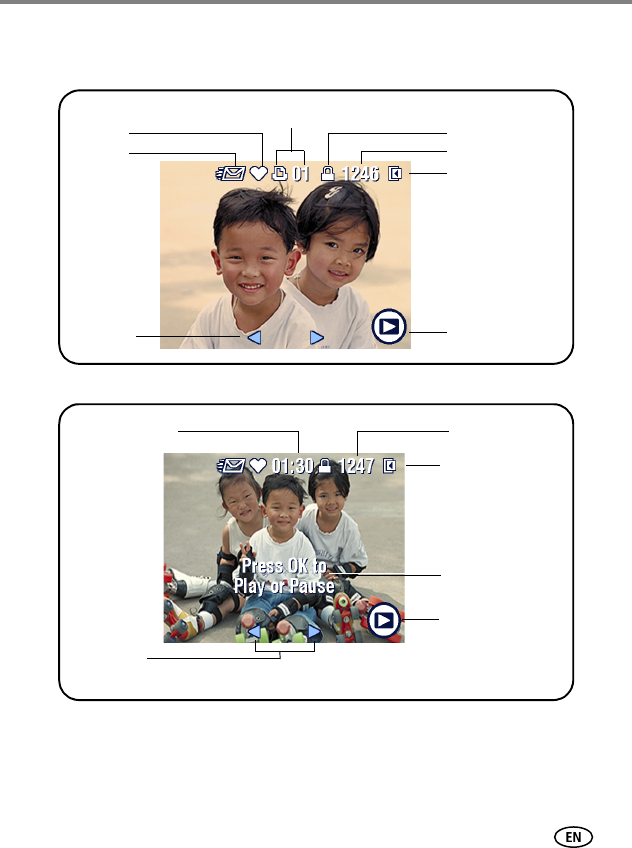
What the review icons mean
Pictures
Videos
Favorite tag
Email tag
Print tag/number of prints
Protect
Picture/video number
Image storage location
Review mode
Scroll arrows
Video length
On-screen
instructions
Video number
Image storage
location
Review mode
Video lengthVideo length
Scroll arrows