
Operation Manual






Maintaining the Printer
3-3
Cleaning the Exterior
1. Remove the trim tray and the exit tray (see “Removing the
Tr i m Tra y a n d t h e E x i t Tra y ” o n p a ge 3 - 2 ).
2. Wipe the exterior of the printer, exit tray, and trim tray with a
damp, lint-free cloth.
3. On the left side and the right side, vacuum the filter openings
to remove dust.
4. Insert the exit tray and the trim tray (see “Inserting the Exit
Tra y a n d th e Tr i m Tra y ” o n p ag e 1 - 2 ).
Accessing the Interior
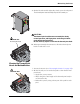
1. Unlock and open the front door.
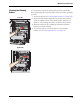
2. Rotate the thermal head release lever on the left side (labeled
L1) or the right side (labeled R1) down to the unlocked
position.
D4000 Duple
x Ph
oto Print
e
r
Menu
Ent
er
R
e
wind/Unload
A
dv
ance/Load
Pow
er
R
eady
Er
r
or