
User manual




7
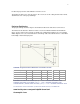
Position the projector the desired distance from the screen.
The distance from the lens of the projector to the screen, the zoom setting, and the video format
determine the size of the projected image.
Projector Positioning
The projected image becomes larger as the distance between the unit and screen increases.
The manual zoom allows the distance from the screen to be within a minimum and maximum
range. See the chart on the next page for details. The example below defines the screen height,
width, diagonal, offset, etc. Note the bottom of the image starts about below the lens center with a
horizontally or flat mounted projector.
HDP404 Projection Throw Distance 16:9 Video Screen:
Screen Diagonal 92" 103" 106" 110" 122.5" 146.75"
Minimum Distance 149" 166" 171" 178" 198" 237"
Maximum Distance
178" 199" 205" 212" 237" 284"
Screen offset 16" 18" 19" 20" 23" 26"
Viewing Area 45"x80"
50.5"x89.75"
52"x92"
54"x96"
60"x107"
72"x128"
MAXIMUM DISTANCE TO SCREEN (16:9) = 1.935 x SCREEN DIAGONAL SIZE
MINIMUM DISTANCE TO SCREEN (16:9) = 1.612 x SCREEN DIAGONAL SIZE
SCREEN OFFSET (IMAGE DROP OR RISE) (16:9) = 0.177 x SCREEN DIAGONAL SIZE
An interactive screen calculator (in Microsoft Excel format) is available at:
www.knollsystems.com/prod-hdp404-throw.html
Anamorphic Lens