
User guide


Now choose one of the following shooting modes:
• LOOP/SCRUB
• TIME LAPSE
• STOP MOTION
Loop/Scrub
1. Set TIME and RAMP values by selecting with Enter and adjusting with the Up and
Down arrows:
• Time – The amount of time it will take to complete entire move
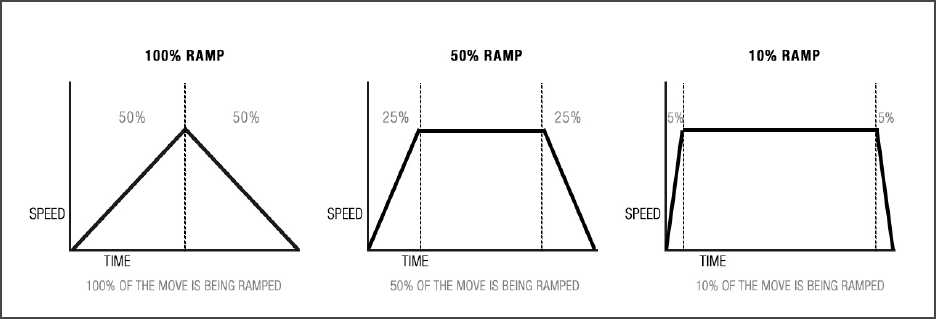
• Ramp – Percentage value indicates the change in speed of the movement over the entire
move. The time value to the right shows how fast/slow the system gets up to the top speed
or how fast/slow the camera comes to a stop.
1. Press ENTER to select RUN.
• Scrubbing – Press ENTER while Looping to enter SCRUB mode. This feature will allow
you to manually advance the position of the Slide, Pan & Tilt axis within the programmed
move by holding the LEFT or RIGHT arrow button.
Time Lapse
1. Select SHOOT/MOVE/SHOOT or CONTINUOUS mode:
• Shoot/Move/Shoot – Camera will only re when not moving. That is, the camera will re,
move to next position, stop and re.
• Continuous – Camera will move without stopping and re throughout the duration of the
move
*If using a 3rd party intervalometer, select Continuous and set the overall run time by increasing
or decreasing the Photos value. The exposure, delay and photo values will not be used.
Fig. A
7