
User Manual
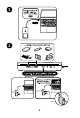



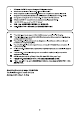


1. Connect the dock to your laptop using the included USB-C cable.
The Laptop USB-C port should support Alt Mode and Power Delivery. Make sure that the Kensington logo and Qi charging pad are facing upward.
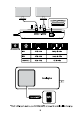
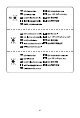
2. The front of the dock (from left to right).
Two USB-A 3.2 Gen2 10 Gbps (5V/0.9A) ports for connecting accessories such as keyboards, mice, USB drives, cameras, and printers.
One USB-C 3.2 Gen2 10Gbps (5V/0.9A) port. This can be used to connect devices such as external hard drives, your laptop’s power adapter, or an optional 100W USB-C Power Adapter.
Minimum of 85W Power Delivery required from your USB-C adapter.
Dock indicator light.
Dock/Qi charging toggle switch.
Qi charging indicator light.