
User manual






15-6 SCPI Reference Tables Model 2700 Multimeter/Switch System User’s Manual
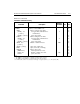
Table 15-2
DISPlay command summary
Command Description
Default
parameter
Ref SCPI
DISPlay (see Note) Sec 1
[:WINDow[1]] ✓
:TEXT Path to control user text messages. ✓
:DATA <a> ASCII message “a” (up to 12 characters). (none) ✓
:DATA? Query text message. ✓
:STATe <b> Enable or disable message mode. OFF ✓
:STATe? Query text message state. ✓
:ENABle <b> Enable or disable the front panel display. ON ✓
:ENABle? Query state of the display. ✓
Note: *RST and SYSTem:PRESet have no effect on commands in this subsystem. The listed defaults are power-on defaults.
Table 15-3
FORMat command summary
Command Description
Default
parameter
Ref SCPI
FORMat Sec 14
[:DATA] <type>
[,<length>]
Select data format (ASCii, SREal or DREal). ASCii
[:DATA]? Query data format. ✓
:ELEMents <item list> Specify data elements (READing, CHANnel,
UNITs, RNUMber, TSTamp, and LIMits).
(see Note) ✓
:ELEMents? Query data elements. ✓
:BORDer <name> Select binary byte order (NORMal or
SWAPped).
SWAPped ✓
:BORDer? Query byte order. ✓
Note: The SYSTem:PRESet and *RST default is READ, UNIT, RNUM, and TST.