
Specifications



2
ENGLISH
Installation
Internet
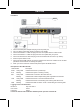
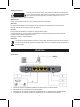
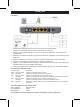
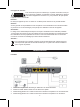
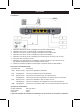
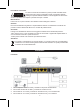
1. Use the included power adapter and plug it into the power port.
2. Use your ADSL signal cable and plug it into the voice splitter.
3. Use the included RJ-11 cable and plug it into the voice splitter and the modem/router.
4. Use the included RJ-11 cable and plug it into the voice splitter and your phone.
5. Use the enclosed RJ-45 cable and plug it into the modem/router and the PC (or switch).
6. Press the power switch to ON.
7. Use the enclosed USB cable to connect the modem/router to the PC instead of a RJ-45 cable
(install the enclosed driver for enabling this option).
8. When you need to reset the modem/router please press the RESET button.
Description of the LED indicator
LED indicator Description
PWR Always ON Indicates the device is powered up
SYS Blinking Indicates the system is working correctly
DSL Always ON Indicates DSL connection with terminal is OK
Blinking Indicates DSL cable is implementing data negotiation with terminal
LAN Always ON Indicates the device is connected well with the PC
Blinking Indicates the device is transmitting and receiving data with the PC
USB Blinking Indicates the USB connection is OK or transmitting and receiving data
Logging in to the modem/router
Browse to: http://192.168.1.1
User name: admin
Password: admin
For the full manual and installation software please open the enclosed CD