
Micro Component System Instruction Manual

16
Daily Timer Operations
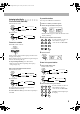
Setting the Daily Timer
Using the Daily Timer, you can wake up with music, etc.
• Set the clock before setting the Daily Timer. (See page 12.)
• To exit from the timer setting, press STOP 7 as required.
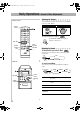
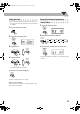
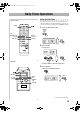
1 Activate the Daily Timer setting.
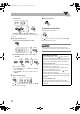
2 Set the On Time.
(1) Set the hour.
(2) Set the minutes as the hour setting above.
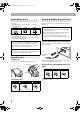
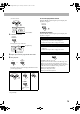
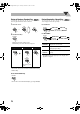
3 Set the Off Time.
(1) Proceed to the Off Time setting.
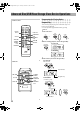
Remote control
TIMER
Main unit
CD 6
STOP 7
FM/AM/
AUDIO IN
4
,
x
CD 6
FM/AM
TIMER
STOP 7
4
,
x
USB
MEMORY
6
USB
MEMORY
6
TIMER
2 sec.
TIMER
PRESET
TIMER
TIMER
Continued on the next page
UX-G200[J].BOOK Page 16 Tuesday, December 2, 2008 3:05 PM