
Compact Component System Instruction Manual


Table Of Contents
- Connections
- Display Indication
- Daily Operations—Playback
- Daily Operations—Sound & Other Adjustments
- Adjusting the Speaker Output Balance
- Reinforcing the Bass Sound
- Applying an Optimal Bass Sound Effect —VARIO BASS
- Selecting the Sound Modes
- Creating Your Own Sound Modes —User Mode
- Creating 3-Dimensional Sound Field—3D Phonic
- Presetting Automatic DVD Video Sound Increase Level
- Changingthe Picture Tone
- Changing the Display Brightness
- Setting the Clock
- Unique Video Disc/File Operations
- Advanced Playback Operations
- On-Screen Operations
- Recording Operations
- Enjoying Karaoke
- Timer Operations
- Setup Menu Operations
- Operating the TV
- Additional Information
- Parts Index
28
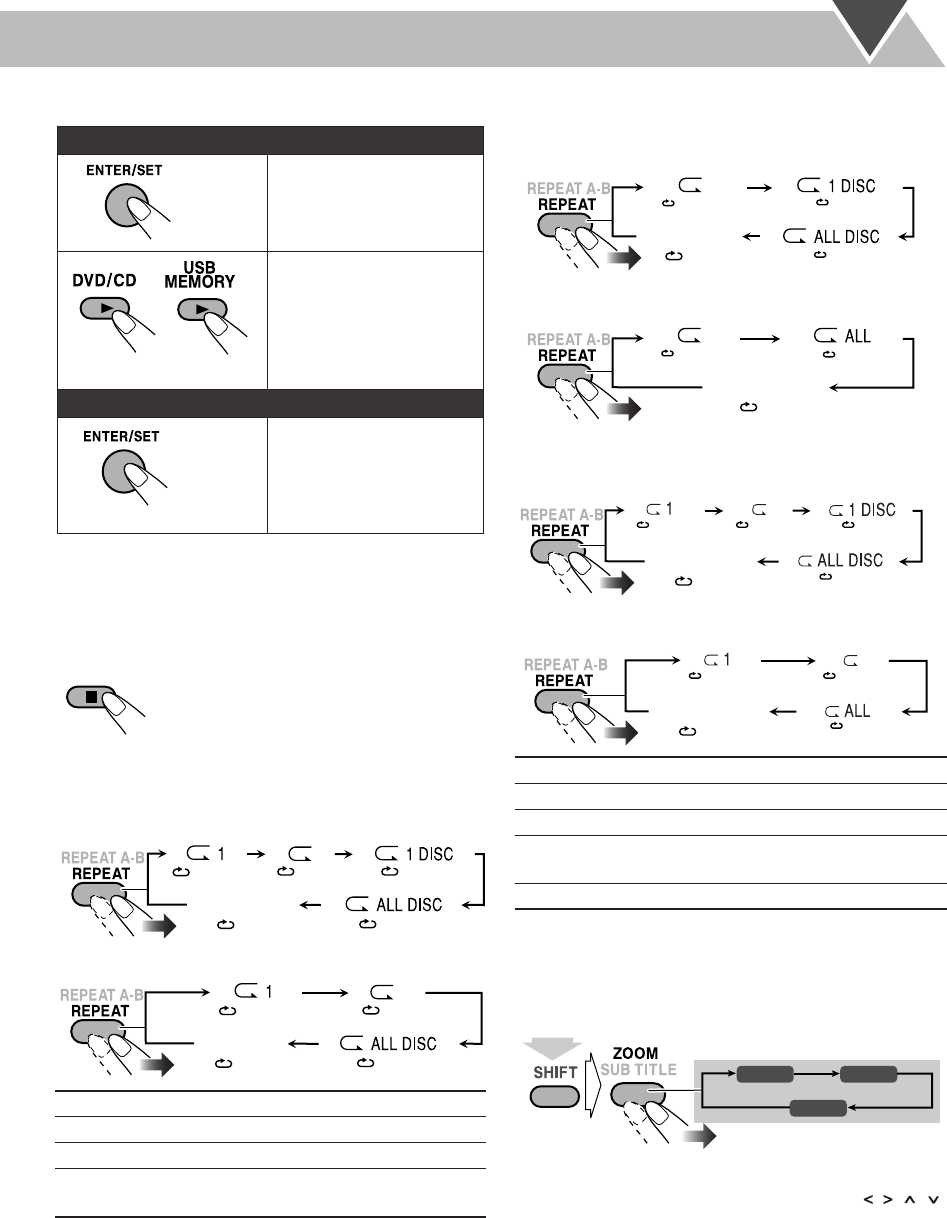
To start playback
• Once you start viewing a JPEG file or Video file, the
control screen disappears.
• To cancel slide-show for JPEG file, and display the current
still picture, press 8
.
To stop playback
To repeat chapter/program/play list for DVD-VR
While playing or before starting playback...
*Not available before starting playback.
To repeat slide-show for JPEG files
While playing or before starting playback...
• When repeating JPEG file on disc:
• When repeating JPEG files in a USB mass storage class
device:
To repeat play for Video files
While playing or before starting playback...
• When repeating Video files on disc:
• When repeating Video files in a USB mass storage class
device:
• For Repeat Play of Audio file, see page 22.
To zoom in the JPEG/ASF file
While playing...
• During slide-show for JPEG file, press 8
to display the still
picture, then...
As the number increases, magnification also increases.
• You can move the zoomed-in area by pressing
, , ,
.
To cancel Zoom,
press ZOOM repeatedly until “ZOOM
OFF” appears on the TV screen.
For JPEG files:
The selected file (still
picture) is displayed until
you change it.
Slide-show playback
starts.
Each file (still picture) is
shown on the screen for a
few seconds, then changes
one after another.
For the other files:
Playback starts with the
selected chapter/file.
• Pressing DVD/CD 3
or
USB MEMORY 3
also
starts playback.
P
1
* Repeats the current chapter.
P
* Repeats the current program/play list.
P
1 DISC
* Repeats all programs on the current disc.
P
ALL
DISC
Repeats all loaded discs.
( PG)
(
OFF)
( DISC)
(
ALL)
( CHAP)
( PL)
(
OFF)
(
ALL)
( CHAP)
Canceled
Canceled
For Original Program
For Play List
P
1
Repeats the current file.
P
Repeats the current group.
P
1 DISC
Repeats all files on the current disc.
P
ALL
Repeats all files in the USB mass storage
class device.
P
ALL DISC
Repeats all loaded discs.
( OFF)
( GROUP/
REPEAT GROUP)
( DISC/
REPEAT DISC)
( ALL/
REPEAT ALL)
Canceled
( OFF)
( GROUP/
REPEAT GROUP)
( ALL/
REPEAT ALL)
Canceled
(
OFF)
( TRACK)
REPEAT TRACK
( GROUP)
REPEAT GROUP
( DISC)
REPEAT DISC
( ALL)
REPEAT ALL
Canceled
(
OFF)
( TRACK)
REPEAT TRACK
( GROUP)
REPEAT GROUP
( ALL)
REPEAT ALL
Canceled
ZOOM 1 ZOOM 2
ZOOM OFF
(while holding...)
DX-J21[J].book Page 28 Tuesday, April 8, 2008 11:32 AM