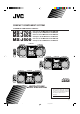
COMPACT COMPONENT SYSTEM SYSTEME DE COMPOSANTS COMPACT MX-J700 MX-J506 MX-J500 SP-MXJ700 SOUND MODE — Consists of CA-MXJ700 and SP-MXJ700. — Composé du CA-MXJ700 et SP-MXJ700. — Consists of CA-MXJ506 and SP-MXJ506. — Composé du CA-MXJ506 et SP-MXJ506. — Consists of CA-MXJ500 and SP-MXJ550. — Composé du CA-MXJ500 et SP-MXJ550.
Warnings, Cautions and Others Mises en garde, précautions et indications diverses CAUTION RISK OF ELECTRIC SHOCK DO NOT OPEN CAUTION: TO REDUCE THE RISK OF ELECTRIC SHOCK, DO NOT REMOVE COVER (OR BACK). NO USER SERVICEABLE PARTS INSIDE. REFER SERVICING TO QUALIFIED SERVICE PERSONNEL.
English Attention –– Commutateur POWER! Déconnecter la fiche de secteur pour couper complètement le courant. Le commutateur POWER ne coupe jamais complètement la ligne de secteur, quelle que soit sa position. Le courant peut être télécommandé. 1. CLASS 1 LASER PRODUCT 2. DANGER: Invisible laser radiation when open and interlock failed or defeated. Avoid direct exposure to beam. 3. CAUTION: Do not open the top cover.
English Introduction We would like to thank you for purchasing one of our JVC products. Before operating this unit, read this manual carefully and thoroughly to obtain the best possible performance from your unit, and retain this manual for future reference. About This Manual Power sources This manual is organized as follows: • When unplugging from the wall outlet, always pull the plug, not the AC power cord. • The manual mainly explains operations using the buttons and controls on the unit.
English Contents Location of the Buttons and Controls ....................... 3 Front Panel ................................................................. 3 Remote Control .......................................................... 5 Getting Started ............................................................ 6 Unpacking .................................................................. 6 Putting the Batteries into the Remote Control ........... 6 Connecting Antennas ....................................
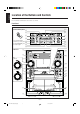
English Location of the Buttons and Controls Become familiar with the buttons and controls on your unit. Front Panel Powered Rolling Panel Press PANEL OPEN/ CLOSE to open the panel. To close the panel, press the button again. Front Panel 4 MX-J700 o ; j k l a / s z d f g h x c v b 1 p 2 q 3 w MX-J506/MX-J500 5 e 6 r 7 t y 8 u 9 i –3– EN01-12.MX-J500/506/700[C]/1 3 00.1.
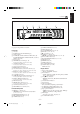
Display Window 1 2 3 5 4 1 7 Front Panel 5 6 7 8 9 p q w e r t y u i Disc trays POWER button and STANDBY lamp (9) Display window For MX-J700: SUBWOOFER VOLUME control (10) For MX-J506/MX-J500: ACTIVE BASS EX. (extension) LEVEL control (10) Remote sensor TAPE 2 3 button and lamp (9, 16) Pressing this button also turns on the unit. AUX button and lamp (9) Pressing this button also turns on the unit.
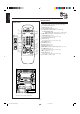
English Remote Control Remote Control 1 p SOUND MODE 2 5 MX-J700 REC START/STOP w FM MODE MX-J506 MX-J500 ACTIVE BASS EX. q TAPE A/B 3 4 SLEEP e 6 r 7 8 9 + t – y u FADE MUTING i 3 2 1 1 Disc number buttons (CD1, CD2, and CD3) (13) Pressing one of these buttons also turns on the unit. 2 SOUND MODE button (10) 3 TAPE A/B button (16) 4 REC START/STOP button (17, 19) 5 For MX-J700: SUBWOOFER + / – buttons (10) For MX-J506/MX-J500: ACTIVE BASS EX.
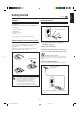
Continued Unpacking Connecting Antennas After unpacking, check to be sure that you have all the following items. The number in the parentheses indicates the quantity of the pieces supplied. FM antenna • • • • A ENN ANT FM antenna (supplied) EXT AM LOOP AM loop antenna (1) FM antenna (1) Remote control (1) Batteries (2) 5 FM 7 IAL X CO A If any is missing, consult your dealer immediately.
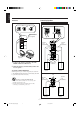
English Connecting Speakers AM antenna 1 FOR MX-J700 3 2 2, 3 1 ANTENNA Vinyl-covered wire (not supplied) Blue AM EXT AM LOOP Speaker cord (blue/black) Speaker cord (blue/black) FM 75 COAXIAL Red Black AM loop antenna (supplied) Black 1 Connect the AM loop antenna to the AM Speaker cord (red/black) LOOP terminals as illustrated. 2 Turn the AM loop antenna until you have the best reception.
English 1 Press and hold the clamp of the speaker To connect audio equipment with an optical digital input terminal terminal on the rear of the unit. You can record CD sound onto the connected digital equipment. 2 Insert the end of the speaker cord into the terminal. • For MX-J700: Match the polarity (colors) of the speaker terminals: Blue (+) to blue (+) and black (–) to black (–); Red (+) to red (+) and black (–) to black (–).
English Common Operations 4 Press Turning On or Off the Power 4 or ¢ to adjust the minute, then press SET. To turn on the unit, press POWER so that the STANDBY lamp goes off. The Powered Rolling Panel opens automatically. To check the clock time To turn off the unit (on standby), press POWER again so that the STANDBY lamp lights up. Press DISPLAY while playing any source. • Each time you press the button, the source indication and the clock time alternate on the display.
Adjusting the Volume You can adjust the volume level only while the unit is turned on. When using the remote control, press SUBWOOFER + to increase the subwoofer volume or press SUBWOOFER – to decrease it. For MX-J506/MX-J500 The ACTIVE BASS EX. (extension) LEVEL control provided for this unit can maintain the richness and fullness of the bass sound while listening to any source at low volume. Turn the VOLUME control clockwise to increase the volume or counterclockwise to decrease it.
English 2 Adjust the SEA pattern. Surround modes *: D.CLUB: Increases resonance and bass. HALL: Adds depth and brilliance to the sound. STADIUM: Adds clarity and spreads the sound, like in an outdoor stadium. 1) Press 4 or ¢ to select the frequency range to adjust (LOW, MID, HIGH). 2) Press 1 or ¡ to adjust the level (–3 to +3) of the selected frequency range. SEA (Sound Effect Amplifier) modes: ROCK: Boosts low and high frequency. Good for acoustic music. POP: Good for vocal music.
Tuning in a Station 2 Press SET. 1 Press FM/AM. The unit automatically turns on and tunes in the previously tuned station (either FM or AM). The Powered Rolling Panel automatically opens. • Each time you press the button, the band alternates between FM and AM. 3 Press PRESET – / + to select a preset number. 2 Start searching for stations. 4 Press SET again. On the unit: Press and hold TUNING – / + for more than 1 second. On the remote control: Press and hold 1 / 4 or ¢ / ¡ for more than 1 second.
English Playing Back CDs Loading CDs Playing Back the Entire Discs — Continuous Play On the unit ONLY: 1 Press 0 for the disc tray (CD1 to 3) You can play CDs continuously. you want to load a CD onto. 1 Load CDs. 2 Press one of the disc number The unit automatically turns on and the disc tray comes out. The Powered Rolling Panel also opens automatically. buttons (CD1, CD2, and CD3) for the disc you want to play.
To locate a particular point in a track • Each time you press the button, CD play mode changes as follows: During play, press and hold 1 or ¡. • 1: Fast reverses the disc. • ¡: Fast forwards the disc. When using the remote control, press and hold 1 / 4 or ¢ / ¡. Random Play Program Play Continuous Play 3 Press one of the disc number buttons (CD1, CD2, and CD3) to select the disc number you want to play. To go to another track Press 4 or ¢ repeatedly before or during playback.
English To stop during play, press 7. • Random play also stops when one of the disc trays is opened. To check the program contents Before playing, you can check the program contents by pressing 1 / 4 or ¢ / ¡ on the remote control. • ¢ / ¡: Shows the programed tracks in the programed order. • 1 / 4: Shows them in the reverse order. To exit from Random play mode, press PROGRAM/ RANDOM repeatedly again before or after play so that the unit enters another play mode.
English Playing Back Tapes You can play back type I, type II, and type IV tapes without changing any settings. To play both sides repeatedly — Reverse Mode Playing Back a Tape Reverse Mode works for both decks at the same time. When it is in use, the tape automatically reverses at the end of a side and the unit starts playing the other side of the tape, and repeats the same process.
English Recording Recording a Tape on Deck B IMPORTANT: • It should be noted that it may be unlawful to re-record pre-recorded tapes, records, or discs without the consent of the owner of copyright in the sound or video recording, broadcast or cable programme and in any literary, dramatic, musical, or artistic embodied therein. • The recording level is automatically set correctly, so it is not affected by the VOLUME control (and the SUBWOOFER VOLUME control for MX-J700; ACTIVE BASS EX.
CD Direct Recording To record an AM station — Beat Cut While recording an AM broadcast, beats may be heard (which are never heard when listening to the broadcast without recording it). If this occurs, press PROGRAM/RANDOM repeatedly, while recording, until the beats are reduced. • Each time you press the button, the display changes to show the following: CUT1 CUT2 Everything on the CD goes onto the tape in the order it is on the CD, or according to the order you have made for Program play.
English Auto Edit Recording 4 Press SET. By using Auto Edit Recording, you can record the CD tracks to fit the tape. Auto Edit Recording makes a program by selecting the CD tracks in numerical order. However, to prevent the end of the last track on the front side from being cut off, the last track is selected so as to fit on the remaining tape length. Tracks to be recorded on the reverse side (SIDE-B) appear. 1 2 3 On the unit ONLY: 1 Load CDs.
Continued There are three timers available — Recording Timer, Daily Timer, and Sleep Timer. 2 Press CLOCK/TIMER again. “ON TIME” appears for 2 seconds, then the unit enters on-time setting mode. Before using the timers, you need to set the clock built in the unit. (See page 9.) Using Daily Timer With Daily Timer, you can wake to your favorite music or radio program. 3 Set the on-time you want the unit to turn on. 1) Press 4 or ¢ to set the hour, then press SET.
English 6 When selecting “– CD Using Recording Timer – –” 1) Press 4 or ¢ to select the disc number, then press SET. 2) Press 4 or ¢ to set the track number, then press SET. The unit enters volume setting mode. With Recording Timer, you can make a tape of a radio broadcast automatically. How Recording Timer actually works When selecting “TUNER FM” or “TUNER AM” Press 4 or ¢ to select the preset station number, then press SET. The unit enters volume setting mode.
English Using Sleep Timer 4 Set the on-time you want the unit to turn on. With Sleep Timer, you can fall asleep to music. You can set Sleep Timer when the unit is turned on. 1) Press 4 or ¢ to set the hour, then press SET. 2) Press 4 or ¢ to set the minute, then press SET. “OFF TIME” appears for 2 seconds, then the unit enters off-time setting mode. How Sleep Timer actually works The unit automatically turns off after the specified time length passes.
English Maintenance To get the best performance of the unit, keep your discs, tapes, and mechanism clean. Handling cassette tapes Handling discs • If the tape is loose in its cassette, take up the slack by inserting a pencil in one of the reels and rotating. • If the tape is loose, it may get stretched, cut, or caught in the cassette. • Remove the disc from its case by holding it at the edge while pressing the center hole lightly. • Do not touch the shiny surface of the disc, or bend the disc.
Design and specifications are subject to change without notice. MX-J700 MX-J506/MX-J500 Amplifier section — CA-MXJ700 Amplifier section — CA-MXJ506/CA-MXJ500 Output Power SUBWOOFERS: Output Power 120 W per channel, min. RMS, driven into 6 Ω at 1 kHz with no more than 10% total harmonic distortion. 100 W per channel, min. RMS, driven into 6 Ω at 63 Hz with no more than 10% total harmonic distortion. MAIN SPEAKERS:50 W per channel, min.
VICTOR COMPANY OF JAPAN, LIMITED V EN, FR MX-J500/506/700[C].COVER/1 J 2 00.1.