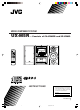
MICRO COMPONENT SYSTEM UX-M5R — Consists of CA-UXM5R and SP-UXM5. CD-R/RW PLAYBACK MICRO REC SYSTEM UX-M5R STANDBY /ON OPEN/ CLOSE DISPLAY MODE REMAIN /RDS MODE TIMER ON/OFF STANDBY/ON CD/RANDOM COMPONENT TUNER INTRO/RDS SEARCH SET TAPE /BAND /REV.MODE RANDOM BAND REV.
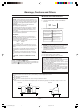
Warnings, Cautions and Others IMPORTANT FOR LASER PRODUCTS IMPORTANT for the U.K. REPRODUCTION OF LABELS DO NOT cut off the mains plug from this equipment. If the plug fitted is not suitable for the power points in your home or the cable is too short to reach a power point, then obtain an appropriate safety approved extension lead or consult your dealer. 1 CLASSIFICATION LABEL, PLACED ON EXTERIOR SURFACE CLASS LASER BE SURE to replace the fuse only with an identical approved type, as originally fitted.
SAFETY INSTRUCTIONS “SOME DOS AND DON’TS ON THE SAFE USE OF EQUIPMENT” This equipment has been designed and manufactured to meet international safety standards but, like any electrical equipment, care must be taken if you are to obtain the best results and safety is to be assured. ✮✮✮✮✮✮✮✮✮✮✮✮✮✮✮✮✮✮✮✮✮✮✮✮✮✮✮✮✮✮✮✮✮✮✮✮✮✮✮✮✮✮✮✮✮✮✮ Do read the operating instructions before you attempt to use the equipment.
Introduction We would like to thank you for purchasing one of our JVC products. Before operating this unit, read this manual carefully and thoroughly to obtain the best possible performance from your unit, and retain this manual for future reference. About This Manual Power sources This manual is organized as follows: • When unplugging from the wall outlet, always pull the plug, not the AC power cord. • The manual mainly explains operations using the buttons and controls on the unit.
Contents Location of the Buttons and Controls ..................... 3 Front Panel ................................................................ 4 Remote Control ......................................................... 5 Getting Started .......................................................... 6 Unpacking ................................................................. 6 Putting the Batteries into the Remote Control .......... 6 Connections .............................................................
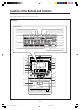
Location of the Buttons and Controls Become familiar with the buttons and controls on your unit. Front Panel Display Window 9 p q 1 2 3 4 PROGRAM SLEEP HBS TOTAL REMAIN INTRO STEREO RANDOM ONE REPEAT ALL ON OFF 5 CD SYNC 6 7 POP CLASSIC ROCK TAPE JAZZ e r MHz kHz t REC y 8 u i 1 w CD-R/RW PLAYBACK 2 3 4 5 6 7 e MICRO COMPONENT SYSTEM UX-M5R STANDBY /ON OPEN/ CLOSE r DISPLAY MODE REMAIN /RDS MODE t INTRO/RDS SEARCH y TIMER ON/OFF SET PROGRAM RANDOM BAND REV.
Continued Front Panel See pages in the parentheses for details. 1 Disc compartment (12) 2 STANDBY/ON button (8) Turns the unit on or off (standby mode). 3 CD/RANDOM button (12, 13) Selects CD mode. Starts or stops random play in CD mode. 4 DISPLAY MODE button (8, 16) Displays the clock time or sets the timer. 5 TIMER ON/OFF SET button (16) Activates/deactivates the timer. 6 Remote sensor (5) Infrared sensor for remote control 7 PROGRAM button (8, 10, 12, 16) CD: programs the track playback order.
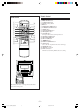
Remote Control Remote Control 1 2 w STANDBY/ON CD/RANDOM 3 REC 4 5 6 7 TUNER TAPE /BAND /REV.
Getting Started Continued Unpacking Connections After unpacking, check to be sure that you have all the following items. The number in the parentheses following each item name indicates the supplied quantity. • DO NOT connect any equipment to the unit while the unit is powered. • DO NOT plug in any equipment until all connections are completed. • Remote control (1) • Batteries (R03 (UM-4)/AAA (24F)) for remote control (2) • AM loop antenna (1) If any is missing, consult your dealer immediately.
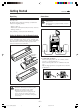
2 Connect the supplied AM loop antenna to the AM LOOP terminal. Place the antenna away from the unit and adjust its position for the best reception. 1 2 3 3 Adjust the position of the FM antenna for the best reception. 4 Connect the AC power cord of the unit to the AC outlet after all other connections have been made. To remove the speaker grilles The speaker grilles can be removed as shown in the illustration below.
Common Operations Continued Turning On or Off the Unit On clock resetting If a power failure occurs or the AC power cord is disconnected, the clock is reset to "00:00" (flashing). In such a case you need to set the clock again. To turn on the unit Press STANDBY/ON on the unit or remote control. The unit turns on with the last source selection remaining valid.
Digital Sound Control The unit’s digital sound control feature enables you to select desired preset equalizer settings (selectable as sound modes) to enjoy special sound effects matching the music type. You can also use the HBS (Hyper Bass Sound) system to enjoy powerful bass sound created by emphasizing low frequencies. To select the desired sound mode PRE EQ /HBS Press PRE EQ/HBS repeatedly.
Listening to FM and MW Broadcasts Tuning In a Station Presetting Stations You can preset 20 FM and 20 MW stations. 1 When the unit is turned on, press TUNER/BAND to select tuner mode. BAND TUNER • There is a time limit in doing the following steps. If the setting is cancelled before you finish, start from step 1 again. The unit tunes in the last station tuned in (either FM or MW). 2 Press TUNER/BAND to select the band, FM or MW. 1 Tune in the station you want to preset.
Receiving FM Stations with RDS RDS (Radio Data System) allows FM stations to send an additional signal along with their regular program signals. For example, the stations send their station names, as well as information about what type of program they broadcast, such as sports or music, etc. When tuned to an FM station which provides the RDS service, the RDS indicator lights up on the display. With the unit, you can receive the following types of RDS signals.
Playing Back CDs Continued This unit can play back audio CDs and CD-R/RW discs. Program Play You can arrange the order in which the tracks are played before you start playing. You can program up to 60 tracks. 1 In stop mode, press PROGRAM. Loading a Disc 1 Press CD/RANDOM to select CD mode. RANDOM The PROGRAM indicator starts blinking. CD 2 Press 0 OPEN/CLOSE. OPEN/ CLOSE The disc tray slides out. PROGRAM 2 Press 4 or ¢ repeatedly to select the desired track.
Random Play Introductory Play You can play all the tracks in random order. The introductory portions of tracks can be played back automatically. Press CD/RANDOM before or during playing. RANDOM Press INTRO/RDS SEARCH. CD The first 10-second portion of each of the tracks is played back in order. The RANDOM indicator lights up. To exit random play mode, press CD/RANDOM again. The RANDOM indicator goes off. To exit introductory play mode, press INTRO/RDS SEARCH again.
Playing Back Tapes Auto Reverse • Use only type I normal tapes. The use of tapes longer than 120 minutes is not recommended, since characteristic deterioration may occur and these tapes easily jam in the pinch roller and the capstan. Loading a Tape 1 Press 0 EJECT to open the tape deck door. Press TAPE/REV.MODE repeatedly to select the desired playback mode. REV. MODE TAPE : playback on one side of the tape only. : both sides are played once.
Recording Recording Tapes IMPORTANT: • It should be noted that it may be unlawful to re-record pre-recorded tapes, records, or discs without the consent of the owner of copyright in the sound or video recording, broadcast or cable program and in any literary, dramatic, musical, or artistic content embodied therein. • The recording level is automatically set correctly, so it is not affected by the volume control.
Using the Timers Continued There are three timers available – daily timer, recording timer and sleep timer. Before using the timers, you need to set the built-in clock (see page 8). Using Daily Timer With the daily timer, you can wake to your favourite music or radio program. At the timer-on time, the unit automatically turns on, sets the volume to the preset level, and starts playing the specified source (radio or CD). Then, at the timer-off time, the unit automatically turns off (on standby).
Using Sleep Timer With the sleep timer, you can fall asleep to music. You can set the sleep timer using the remote control when the unit is turned on. How the sleep timer actually works The unit automatically turns off after the specified time length passes. 1 Press and hold SLEEP on the remote control until the desired time length appears on the display. SLEEP The time length changes from 90 to 10 minutes in 10-minute steps. 2 Wait for a moment after specifying the time length.
Description of the PTY Codes NEWS: News. POP M: AFFAIRS: Topical program expanding or enlarging upon the news – debate, or analysis. Commercial music of current popular appeal. ROCK M: Rock music. MOR M: Easy-listening music of relatively short duration. INFO: Program the purpose of which is to impart advice in the widest sense. LIGHT M: Instrumental music, and vocal or choral works. SPORT: Program concerned with any aspect of sports.
Maintenance To get the best performance of the unit, keep your discs, tapes, and mechanism clean. Handling discs Cassette decks • Remove the disc from its case by holding it at the edge while pressing the centre hole lightly. • Do not touch the shiny surface of the disc, or bend the disc. • Put the disc back in its case after use to prevent warping.
Specifications Amplifier section General Output power 60 W (30 W + 30 W) at 8 Ω (MAX.) 22 W per channel, min. RMS, driven into 8 Ω at 1 kHz, with no more than 10% total harmonic distortion (IEC 268-3) Audio output level PHONES: 800 mV/32 Ω Speakers/Impedance 8 Ω - 16 Ω Power requirement Power consumption Dimensions Mass Speaker Woofer: 10.2 cm cone × 1 Tweeter: 5.1 cm cone × 1 8Ω 160 mm × 269.5 mm × 200 mm (W/H/D) 2 kg/piece Speaker unit Tuner FM tuning range MW tuning range 87.50 MHz - 108.
0502NNMBICORI EN 99_BCV_UXM5R_B.