
Operation Manual





39
Troubleshooting
HDMI Functions Display
Problem
Actions
Page
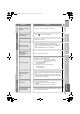
No picture, no sound
z Use the cable marked with HDMI logo. –
Wrong screen size
z Switch “Size” in “HDMI Setting” to “1” or “2”. (480p (525p) only)
z Read the user manual of the connected device and perform the
following:
gCheck if the output setting of the device is correct.
gChange the signal format of the device to other format.
36
–
No sound
z Check if the device is compliant with HDMI.
z Switch “Audio” in “HDMI Setting” to “Digital” or “Auto” for HDMI
devices, or “Analogue” or “Auto” for DVI devices.
(Not available for EXT-6 and EXT-7)
–
36
Green and distorted
screen
z Wait a little for the signal to stabilize when switching the signal
format for an HDMI device.
–
Some inputs cannot be
selected in the sub-
picture
z “EXT-4”, “EXT-5”, “EXT-6”, “EXT-7” inputs and PC mode cannot
be selected in the sub-picture.
z RGB input signal of “EXT-1” and “EXT-2” are not available in
dual-picture mode.
–
“Feature Not Available”
appears
z Is the “T-V LINK” compatible device connected to EXT-2?
z Is the SCART CABLE “Fully Wired”?
z Is the “T-V LINK” compatible device turned on?
After confirming all the conditions above, press “OK” button
again.
–
“ACI Error” appears
z Press W to start “ACI” again.
If you still receive the “ACI Error” after numerous tries, press X
to cancel “ACI”.
–
Some functions do not
work
z It is not a malfunction. Depending on the situation, some
function items will be displayed in gray colour and will not work.
29
Dark bar or noise
appear at the edges of
the screen (1080p
(1125p))
z 1080p (1125p) signal is displayed as “Full Native”. When
viewing in “Full Native”, dark bar or noise may appear at the
edges of the screen. This is resulted from the signal itself, not
due to TV malfunction.
–
LT-42V80BU_EN.book Page 39 Tuesday, August 21, 2007 10:50 AM