
Operation Manual





33
Customising your TV
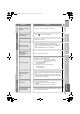
Cancel g Set the time to “0”
Remaining time g Display this menu again
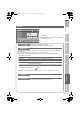
Lock a channel
Sleep Timer
Timer for turning off the TV
Child Lock
Stop children from watching specific channels
1
Display the menu
z OK button does not work.
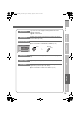
Set an “ID No.”
2
Select a channel and lock it. ( : locked)
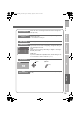
View a locked channel
Use the number buttons to enter the channel number.
When “ ” appears, press “ ” and enter your “ID No.” with the number buttons.
z If you forget your “ID No.”, perform step 1 again.
Sleep Timer
0 120
Off
B set
A select
0400
C set
A select a number
B to the next column
BBC1
_ _ _ _ _ _
AV
P R I D CH / CC
01 02CH
02 03CH
03 04CH
04
05
06
07
08
09
05CH
06CH
01CC
02CC
03CC
04CC
Child Lock
select
(blue)
Lock / Release
Features
Sleep Timer
Child Lock
Type A
Bright
Appearance
OnBlue Back
Favourite Setting
Illumination
OnPower Lamp
OffEco Mode
Features
LT-42V80BU_EN.book Page 33 Thursday, August 30, 2007 2:04 PM