
Operation Manual






25
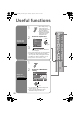
Useful functions
Change the
aspect ratio
1
z When 1080p (1125p) /
720p (750p) signal is
received, the zoom menu
will not be displayed.
z 1080p (1125p) signal is
displayed as “Full Native”.
720p (750p) signal is
displayed as “Full”.
2
Select the aspect ratio
3
Move the picture with S or T while this
bar is displayed
z In PC mode, “Regular” and “Full” can be selected.
z “Full Native” can be selected from the “Zoom”
menu only when 1080i (1125i) signal is received.
z “Full Native” g “What is “Full Native”?” (P. 42)
z Using “Auto” g “Auto in “Zoom”” (P. 40)
ZOOM
Zoom
Auto
Regular
Panoramic
14 : 9 Zoom
16 : 9 Zoom
16 : 9 Zoom Subtitle
Full
Full Native
Aselect
Bset
16 : 9 Zoom
Enjoy the
good sound
1
2
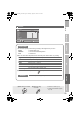
Select the “MaxxAudio”
setting
z You can adjust the “MaxxAudio” settings in the
“Sound” menu. (P. 32)
z If you connect the Headphone to the TV,
“MaxxAudio” setting is turned to “Off”.
MaxxAudio
A select
B set
Sound
MaxxAudio Low
Off
Off
Reset
MaxxBass
MaxxTreble
MaxxStereo
MaxxVolume
Balance
Voice Enhancer
LT-42V80BU_EN.book Page 25 Tuesday, August 21, 2007 10:50 AM