
Operation Manual





11
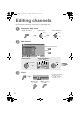
Edit the channels registered with “Auto Program” in “Initial settings” (P. 9).
A
Display the “Edit” menu
Display the menu bar Select “Set Up” Select “Edit/Manual”
B
Edit channels
To the previous menu
g
Exit
g
C
Finish
z If “Feature Not Available”
appears g (P. 39)
z “T-V LINK” g “What is
“T-V LINK”?” (P. 9)
When using
“T-V LINK”
When not using
“T-V LINK”
A select
B next
B next
A select
Manual
Move
ID
DeleteInsert
BBC1
_ _ _ _ _ _
AV
PR ID
Edit
CH / CC
01 02CH
02 03CH
03 04CH
04
05
06
07
08
09
05CH
06CH
01CC
02CC
03CC
04CC
select a channel
Select channel Select edit function
ID
Insert Delete
Manual
Move
Next
T - V LINK
Recording DeviceDownload TV
Editing channels
LT-42V80BU_EN.book Page 11 Tuesday, August 21, 2007 10:50 AM