
Operation Manual






35
Customising your TV
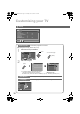
To change the country, perform step 1 only.
Auto Program
Automatically registers the channels
1
Select the country of installation
2
Start “Auto Program”
z If “ACI Start” appears, select and start settings.
(This will set up cable television channels.)
g“What is “ACI” (Automatic Channel Installation)?” (P. 40)
Edit channels
g
“Editing channels” (P. 11)
Edit/Manual
g “Editing channels” (P. 11)
Language
Select a language for the menus and Message Board
Auto Program
Belgium
Nederland
Italia
France
Deutschland
United Kingdom
Country
Suomi
Norge
Sverige
Danmark
Switzerland
Ireland
Start
More
(yellow)
select
z For the next page
(blue)
Auto Program
CH
02
0%
BBC1
AV
PR ID
Edit
CH/CC
01 02CH
02 03CH
03 04CH
04
05
06
07
08
09
05CH
06CH
01CC
02CC
03CC
04CC
Language
Suomi
Svenska
Norsk
Dansk
Nederlands
Castellano
Italiano
Deutsch
Français
English
Català
Türkçe
Português
Magyar
Polski
Auto Program
Edit/Manual
Language
OffDecoder
(EXT-2)
Component Auto Select On
EXT Setting
HDMI Setting
PC Position
OffAuto Demonstration
Set Up
Set Up
LT-32P80BU.book Page 35 Tuesday, June 12, 2007 2:50 PM