
Operation Manual







29
Customising your TV
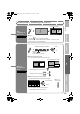
A
Display the menu bar
B
Display the desire menu
C
Change or adjust the setting
z The menu
disappears after
one minute of
inactivity.
To the previous
screen
g
To enter an item’s menu
D
Close the menu
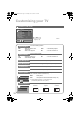
select
Picture
Picture
Picture Mode
Bright- 1
Standard
Normal
Reset
Contrast
Bright- 2
Sharp
Colour
Hue
Colour Temp.
Features
select
change / adjust
select
Super DigiPure Auto
Movie Theatre Auto
Colour Management On
Picture Management On
Smart Picture On
MPEG Noise Reduction On
Colour System
4 : 3 Auto Aspect
Features
7 9 /,1.
5HFRUGLQJ'HYLFH'RZQORDG79
When “T-V LINK” menu appears.
Next
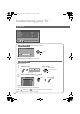
Press to hide the
bottom area of the
menu. Press again
to display it.
z Depending on the
situation (video
signal formats,
external inputs,
etc.), some items
will be displayed
in gray colour
and will not work.
You will not be
able to change
their setting as
well.
Note
(E.g. Features)
LT-32P80BU.book Page 29 Tuesday, June 12, 2007 2:50 PM