
Operation Manual





GB-6
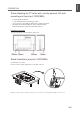
Front and Side Panel
Here the shown illustration is LT-32DC9BH model and may be somewhat different from your TV.
Accessories
Please check that the following accessories are included with your TV.
Note: Package contents may vary according to area.
Remote control
(RM-C1892B)
Inserting Batteries
Insert two AA size batteries ensuring that the plus(+) and minus(-)
signs of the batteries are correctly aligned.
NOTE: Do not mix different battery types such as alkaline with
manganese.
AA batteries (X2)
User’s manual
Power cord
Note: Standandscrewsarealsoincluded.Fordetails,refertopage7.(onlyforLT-32DC9BH)
PREPERATION
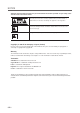
Changes input source.
Displaysmenu/confirmsselection.
Changeschannel/movesselection.
Adjustsvolume/movesselection.
PowerOn/Off
Power lamp
ON:Lit(Blue)/STANDBY:Unlit
Remote control sensor