
Operation Manual




GB-30
Analog channels can be searched and edited only in Analog TV input mode.
NOTE: YoucanaccessthismenuonlyinAnalogTVinputmode.
How to Navigate the Menu
Button Action
MENU
Displays the menu.
▲/▼ Moves among menus or items.
OK or
► Selects (Enters) a menu or confirms a selection.
◄/► Adjusts or configures the option.
BACK
Goes back to the previous screen.
NUMBER
Enters the number (0~9).
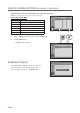
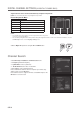
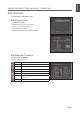
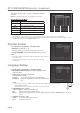
1 Switch to Analog TV input mode using the AV or TV/DTV button.
2 Select Installation menu.
● Country:Showsthecountry.
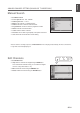
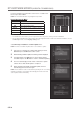
Automatic Search
Select Auto Search > Search to start to search channels.
The found channels are automatically saved in order.
To stop searching channels, press the BACK button.
ANALOG CHANNEL SETTINGS
(IN ANALOG TV MODE ONLY)
> I n s t a l l a t i o n
Co u ntr y
Au to S ear ch
Man ual Search
Edi t C h ann els
Net her l and
Move Enter
> > A u t o S e a r c h
Sea rch
Stop
Ana log Cha nne l Foun d 3 0
Sca n Prog res s 8 0%
> I n s t a l l a t i o n
Co u ntr y
Au to S ear ch
Man ual Search
Edi t C h ann els
Net her l and
Move Enter
Menus Items
Options