
Operation Manual








GB-27
MENU SETTINGS
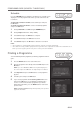
Installation Settings (In Analog TV Mode Only) : > Installation
● Country:Showsthecountry.
● Auto Search:(Refertop.30)
● Manual Search:(Refertop.31)
● Edit Channels:(Refertop.31)
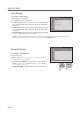
Feature Settings : > Feature
● Language:Selectsthemainlanguage.
● Time Setting:(Refertop.28)
● Parental Control:(Refertop.28)
● OSD Transparency:30-50-70-100-Disable
● Blue Back:Off-On
Whenwatchingachannelwithnoorpoorreception,orifthereisno
input from an external device, you can change the screen into a blue.
● Power Lamp:On-Off
Illuminates the power lamp in blue on the front panel.
● 4:3 Aspect Setting:Panoramic-Regular(Refertop.21)
Selectadefaultaspectratiofor4:3signalwhentheaspectratioissetto
Auto.
● Default Setting:(EnabledonlyinAnalogTVmode.)
Sets the current all settings of the TV to the default settings except for the Digital TV mode settings.
NOTE:
Please note that once you perform the Default Setting, all data such as analog channel list, and user configured data are
deleted.
After completing the default setting, the installation wizard (APS) for analog channels will appear automatically in a few
seconds.
For more information about Default Setting of the digital channels, refer to p.29.
▪
▪
▪
ENGLISH
> I n s t a l l a t i o n
Co u ntr y
Au to S ear ch
Man ual Search
Edi t C h ann els
Net her l and
Move
Enter
> F e a t u r e
Lan gua g e
Ti m e S etti ng
Pa ren tal Co ntr ol
OSD Tr ans parency
Blu e B a ck
Po we r La mp
4:3 As pect Set ting
Def ault Se t tin g
Eng lis h
30
Off
On
Pa nor ami c
Move
Enter