
Operation Manual








GB-21
BASIC OPERATION
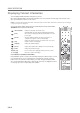
Selecting the Main Input Source
Onceyouhaveconnectedyourvariousaudioandvideosystems,youcanviewdifferentsourcesbyselectinginput
sources.
1 Press the AV button.
2 Select a main input among the sources and press the OK button.
NOTE: YoucaneasilyswitchtodigitalTVfromdifferentsourcesbypressingtheTV/DTV button.
Setting the Aspect Ratio
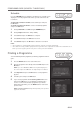
YoucanselectanaspectratiomodebypressingtheZOOM button repeatedly on the remote control.
Auto - Regular - Panoramic - 14:9 Zoom - 16:9 Zoom - 16:9 Zoom Subtitle - Full
SUBTITLE
SUBTITLE
SUBTITLE
Regular Panoramic 14:9Zoom
SUBTITLE
SUBTITLE
SUBTITLE
16:9Zoom 16:9ZoomSubtitle Full
NOTE:
When
Autoisselected,youcanselectadefaultaspectratiofor4:3signal.(exceptwhen480p/576pmode)
(Refer to p.27)
WhenthecomponentorHDMIinputmodewith480por576psignal,youcanselectonlytheAuto,FullorRegular.
WhenthecomponentorHDMIinputmodewith720por1080isignal,youcanselectonlytheFull,HDZoom or Slim.
SUBTITLE
SUBTITLE
SUBTITLE
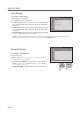
Full HDZoom Slim
Forpictureswitha16:9aspectratiothathavebeensqueezedintoanormalpicture(4:3aspectratio),selectFullmodeto
restore their original dimensions.
To move the picture vertically:
If you cannot see subtitles at the bottom of the screen, or if the top or bottom is cut off, move the picture vertically
usingthe▲/▼buttonbeforethedisplaydisappears.
NOTE: If you change the aspect ratio mode, the picture returns to its default position.
▪
▪
▪
▪
ENGLISH