
Owner's Manual


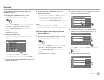

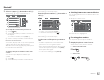

Table Of Contents
- Instruction Manual
- Reset
- Clock Set
- Initial Settings
- Bluetooth PIN (0000)
- Table of Contents
- Compatibility
- Parts & Controls
- Basic Operations
- Getting Started
- Various Screens and Operations
- Disc
- Video
- USB
- Android / iPod / iPhone
- Tuner
- SiriusXM Satellite Radio
- Pandora
- iHeartRadio
- Spotify
- Other External Components
- Bluetooth
- Settings
- Optional Remote Control
- Connection / Installation
- Maintenance
- Troubleshooting
- Specs
- Warranty

Bluetooth®
Bluetooth®
3
Select a contact (1), then make a call (2).
When item 1, 2 or 3 is selected in step 2:
Device Name 1
1
Device Name 2
2
Name 1
1234XXXXXX
Name 2
2345XXXXXX
Name 3
3456XXXXXX
Name 4
4567XXXXXX
Name 5
8901XXXXXX
A-Z
To use alphabet search in the phone book
1 Touch [
A-Z].
2 Touch the first letter you want to search for on
the keypad.
To search for a number, touch [1,2,3...].
3 Select a contact you want to call from the list.
Phone book search results:
“Sort order”, “display order” or any other equivalent
settings of the phone may affect and show
different search results (page display) of the phone
book shown on the main unit.
To display other phone numbers in the same
contact
You can store up to 10 phone numbers per
contact.
1 Touch [
].
2 Select a contact you want to call from the list.
Switching between two connected devices
You can change the device to use when 2 devices are
connected.
On the phone control screen:
Device Name 1
1
Device Name 2
2
1234XXXXXX
12 3
45 6
78 9
*
0/+ #
X
The active device is highlighted.
Presetting phone numbers
You can preset up to five phone numbers.
1 Display the phone control screen.
On the Home screen, touch as follows:
For KW-V250BT/KW-V25BT:
For KW-V350BT:
When item 4 is selected in step 2:
Enter the phone number (1), then make a
call (
2).
Device Name 1
1
Device Name 2
2
1234XXXXXX
12 3
45 6
78 9
*
0/+ #
X
• To enter “+”, touch and hold [0/+].
• To delete the last entry, touch [
X
].
When item 5 is selected in step 2:
Say the name of the person you want to
call.
• Available only when the connected mobile
phone has a voice recognition system.
• If the unit cannot find the target, “Please speak
into the microphone” appears. Touch [Start],
then say the name again.
• To cancel voice dialling, touch [Cancel].
37
ENGLISH
03_KWV_2019ST_KR_Body01.indd 37 22/6/2018 5:22:05 PM