
Owner's Manual


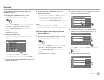

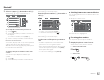

Table Of Contents
- Instruction Manual
- Reset
- Clock Set
- Initial Settings
- Bluetooth PIN (0000)
- Table of Contents
- Compatibility
- Parts & Controls
- Basic Operations
- Getting Started
- Various Screens and Operations
- Disc
- Video
- USB
- Android / iPod / iPhone
- Tuner
- SiriusXM Satellite Radio
- Pandora
- iHeartRadio
- Spotify
- Other External Components
- Bluetooth
- Settings
- Optional Remote Control
- Connection / Installation
- Maintenance
- Troubleshooting
- Specs
- Warranty

iHeartRadio
iHeartRadio
4
[ ]
Displays the <Station Search> screen or
the station list.
[
]
Dislikes the currently playing content.
[
]
Likes the currently playing content.
[
Io]*2
Starts/stops playback.
[
IW]*1
Starts/pauses playback.
[SCAN]*2
Scans stations randomly.
[
T]*1
Skips the current track.
*1 Appears only for the custom station screen.
*2 Appears only for the live station screen.
Selecting the variety level for your custom
station
1 Display the variety level selection screen.
On the source control screen, touch as follows:
2 Select the variety type.
Discovery Tuner
Familiar
Mixed
Less Familiar
[Familiar]
Distributes well-known tracks.
[Mixed] Distributes a mix of artists and
track names.
[Less Familiar] Distributes a wide variety of
tracks including lesser-known
ones.
Searching for a station
1 Display the <Station Search> screen.
On the source control screen, touch as follows:
2 Select a station.
• The items displayed on the <Station Search>
screen differ depending on the information sent
from iHeartRadio.
Favorites
Station Search
Recent Stations
Live Radio
Artist Radio
Podcasts
• To return to the top layer, touch [ ] .
• To return to the upper layer, touch [
].
Editing the <Favorites> list
1 Display the <Station Edit> screen.
On the source control screen, touch as follows:
Then, on the <Station Search> screen, touch as
follows:
2 Select stations (1), then delete the
selected stations (
2).
• A check mark appears beside the selected station.
Station 01
Station Edit
Station 02
Station 03
Station 04
Station 05
Station 06
• To return to the top layer, touch [ ] .
• To return to the upper layer, touch [
].
29
ENGLISH
00_KWV_2019ST_KR.indb 29 1/6/2018 8:19:17 AM