
Operation Manual




English
32
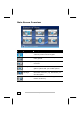
Main Screen Overview
Button Name Description
Keypad You enter the telephone number to be
called by means of the keypad.
Search Starts the search for a mobile phone al-
ready paired.
Call routing Displays the course of the calls made and
received.
Pairing For the coordination between your navi-
gation system and your mobile phone.
Bluetooth
Manager
You will be able to carry out different
Bluetooth functions (e.g. deactivate) un-
der this option.
Exit You will leave the Bluetooth application by
means of this key.