
Operating instructions





48
Operation
㪊
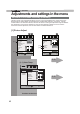
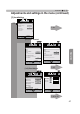
Adjustments and settings in the menu (continued)
Exit
MENU
BACK
Back
Select
Operate
IP Addressޓ
Subnet Mask
Default Gateway
Network
DHCP Client
On
Function
Set
MAC Address
##$$%%&&''((
㪈㪐㪉㪅㩷㪈㪍㪏㪅㩷㩷㩷㩷㪇㪅㪉㪌㪋
㪉㪌㪌㪅㩷㪉㪌㪌㪅㩷㪉㪌㪌㪅㩷㩷㩷㪇
㪈㪐㪉㪅㩷㪈㪍㪏㪅㩷㩷㩷㩷㪇㪅㩷㩷㩷㪉
[5-1] Network
[5-1]
Exit
MENU
BACK
Back
Select
Operate
Trigger
Off Timer
Remote Code
Network
Lamp Reset
Remote Code
High Altitude Mode
Off
Off
Off
Function
45%
㪘
Exit
MENU
BACK
Back
Select
Operate
Display Setup
Back Color
Menu Display
Menu Position
On
Line Display
㧡sec
Source Display
On
Logo
On
Language
English
Black
[4] Display Setup
[5] Function
P. 71
P. 72
P. 73