
Operating instructions





Operation
45
ENGLISH
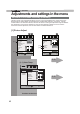
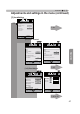
Adjustments and settings in the menu (continued)
[2] Input Signal
When inputting 2D signals
P. 60
P. 63
[2-1]
[2-3]
[2-2]
[2-1]
[2-3]
Input Signal
3D Setting
Parallaxޓ
On
2D/3Dޓ
Crosstalk Cancelޓ
Auto
3D Formatޓ
0
Intensityޓ
Sub Title Adjust
1
Exit
MENU
BACK
Back
Select
Operate
On
Exit
MENU
BACK
Back
Select
Operate
Level Check
Input Signal
HDMI
Off
Control with HDMIޓ
Auto
Color Spaceޓ
Standard
Input
[2-1] HDMI
P. 61
The "Input Signal" menu display during 3D signal input
is the same as the menu display for "[2-3] 3D Setting".
(*)
Exit
MENU
BACK
Back
Select
Operate
Aspect(Video)
Progressive
3D Setting
HDMI
COMP.
Mask
Auto
Picture Position
㪈㪍㪑㪐
㪦㪽㪽
Input Signal
90
70
30
Exit
MENU
BACK
Back
Select
Operate
Aspect(Video)
Progressive
3D Setting
HDMI
COMP.
Mask
Auto
PCޓ
Picture Position
㪈㪍㪑㪐
㪦㪽㪽
Input Signal
Continue to the next
(*) When there is a PC signal
input, 㵰Aspect (PC)㵱 is
displayed.
When inputting 2D signals