
User manual



46
Initial Setup
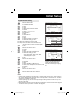
The DIGITAL-IN option can only be displayed in the INITIAL SETUP menu when a HDMI480p
picture signal is being input to the DIGITAL-IN terminal. This option adjusts the position when
a HDMI or DVI 480p picture signal is being displayed on the screen. There are two types of
HDMI480p picture signals: 640x480 and 720x480. If the displayed picture is slightly shifted, the
position can be adjusted by selecting either AUTO, SIZE1 or SIZE2.
Press the M
ENU button
π†
To DIGITAL-IN
è
To enter
π†
To select AUTO, SIZE1 or SIZE2
Press the M
ENU button to finish
Note:
• The DIGITAL-IN menu can only be displayed when a HDMI or DVI 480p picture signal is
input to the Digital-In terminal and the picture is being displayed on the screen.
Digital-In
INITIAL SETUP
SELECT OPERATE EXIT
MENU
NEXT PAGE
PREVIOUS
(1/5)
DIGITAL-IN
DIGITAL-IN AUDIO
AUTO
DIGITAL
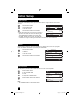
This feature is used if you have a DTV or HDMI
compatible component connected to your TV.
Press the MENU button
π†
To DIGITAL-IN AUDIO
è
To select “ANALOG”, “DIGITAL” or AUTO
Press the MENU button when fi nished
Notes:
• If your DTV or HDMI component is capable of digital audio and video, choose DIGITAL. If
your DTV or HDMI component is capable of analog audio and digital video, choose ANALOG.
• Refer to your DTV or HDMI component’s instruction manual for more information.
• When you select AUTO, the television will select "ANALOG" or "DIGITAL" automatically,
depending on the audio input from the HDMI.
• When you select DIGITAL, select PCM on Digital Sound in the Digital Setup menu. See page
63.
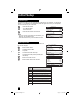
Digital-In Audio
INITIAL SETUP
SELECT OPERATE EXIT
MENU
NEXT PAGE
PREVIOUS
(1/5)
DIGITAL-IN
DIGITAL-IN AUDIO
AUTO
DIGITAL
LCT1855 "B" English 46LCT1855 "B" English 46 10/3/05 10:24:14 AM10/3/05 10:24:14 AM