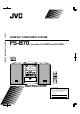
FS-B70 COMPACT COMPONENT SYSTEM WJEM COMPACT COMPONENT SYSTEM FS-B70 —Consists of CA-FSB70 and SP-UXB70 STANDBY/ON VOLUME DISC SELECT TAPE CD CD1 CD2 CD3 1 2 3 4 5 6 8 AUX/DVD TREBLE 7 FM/AM BASS 10 CD4 CD5 UP BASS SET DISPLAY CLOCK/ TIMER SLEEP TREBLE DOWN CANCEL 3/8 CD 23 TAPE FM/AM AUX CD 1 REV. MODE REC CD REC MODE CD 2 PLAY MODE REPEAT FM MODE CD 3 5-CD 9 +10 A.
Warnings, Cautions and Others Mises en garde, précautions et indications diverses CAUTION RISK OF ELECTRIC SHOCK DO NOT OPEN CAUTION: TO REDUCE THE RISK OF ELECTRIC SHOCK. DO NOT REMOVE COVER (OR BACK) NO USER SERVICEABLE PARTS INSIDE. REFER SERVICING TO QUALIFIED SERVICE PERSONNEL.
CAUTION To reduce the risk of electrical shocks, fire, etc.: 1. Do not remove screws, covers or cabinet. 2. Do not expose this appliance to rain or moisture. ATTENTION Afin d’éviter tout risque d’électrocution, d’incendie, etc.: 1. Ne pas enlever les vis ni les panneaux et ne pas ouvrir le coffret de l’appareil. 2. Ne pas exposer l’appareil à la pluie ni à l’humidité.
Introduction We would like to thank you for purchasing one of our JVC products. Before operating this unit, read this manual carefully and thoroughly to obtain the best possible performance from your unit, and retain this manual for future reference. About This Manual This manual is organized as follows: • This manual mainly explains operations using the buttons on the remote control.
Contents Location of the Buttons and Controls ............................. 3 Front Panel ................................................................................ 3 Remote Control ......................................................................... 5 Getting Started .................................................................. 6 Unpacking ................................................................................. Connecting Antennas ..................................................
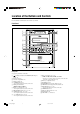
Location of the Buttons and Controls Become familiar with the buttons and controls on your unit. Front Panel r t 1 2 3 4 5 6 7 8 9 p q VOLUME DISC SELECT TAPE CD CD1 CD2 CD3 AUX/DVD TREBLE FM/AM BASS CD4 y u i o ; CD5 w 5-CD 5-CD CHANGER, PLAY&EXCHANGE e PHONES Front panel See pages in parentheses for details.
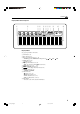
Continued Display window on the front panel 1 3 4 2 1 CD 2 3 PRGM RANDOM 4 5 6 7 8 0 AHB PRO 5 CD ALL A - B 9 TAPE REC - DAILY AUTO STEREO SLEEP REC STANDBY MONO Display window See pages in parentheses for details.
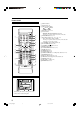
Remote Control See pages in parentheses for details. STANDBY/ON 1 1 2 3 4 5 6 DISPLAY 7 8 9 CLOCK/ TIMER +10 SLEEP p q w 10 e UP BASS TREBLE r 2 3 SET DOWN CANCEL t 4 5 6 3/8 CD 23 TAPE FM/AM AUX CD 1 REV. MODE REC CD REC MODE CD 2 PLAY MODE REPEAT FM MODE y 7 CD 4 u i o ; CD 5 a CD 3 A.
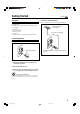
Getting Started Unpacking Continued To connect an outdoor FM antenna Before connecting it, disconnect the supplied FM antenna. After unpacking, check to be sure that you have all the following items. The number in parentheses indicates the quantity of each piece supplied. Outdoor FM antenna (not supplied) • FM antenna (1) • AM loop antenna (1) • Remote control (1) • Batteries (2) If any item is missing, consult your dealer immediately.
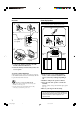
Connecting Speakers AM antenna To connect speakers 1 You can connect the speakers using the speaker cords. 1 ANTENNA 2 3,4 Vinyl-covered wire (not supplied) SPEAKERS 2 RIGHT Speaker cord LEFT SPEAKER IMPEDANCE 6~16Ω Speaker cord AM loop antenna (supplied) 1 Connect the AM loop antenna to the AM LOOP terminals as illustrated. 2 Turn the AM loop antenna until you have the best reception.
To remove the speaker grilles The speaker grilles are removable as illustrated below: Holes Projections NOW you are ready to plug in the unit and any other connected equipment. IMPORTANT: Be sure to check that all connections have been made before plugging in the power cord. Putting the Batteries into the Remote Control Insert the batteries—R6(SUM-3)/AA(15F)—into the remote control by matching the polarity (+ and –) on the batteries with the + and – marking on the battery compartment.
Basic and Common Operations Setting the Clock To change the clock Before operating the unit any further, first set the unit’s clock. When you plug in the power cord, “AM 12:00” starts flashing on the display. You can set the clock when the unit is either turned on or in standby mode. On the remote control ONLY: 1 Press CLOCK/TIMER. CLOCK/ TIMER The hour digits start flashing on the display. The minute digits start flashing. • When you press and hold UP or DOWN, the hour digit changes continuously.
Continued Turning On the Power STANDBY/ON To turn on the unit, press STANDBY/ON (or on the unit). The STANDBY/ON lamp on the unit lights green. • When you press the source button—3/8 CD, 2 3 TAPE, FM/AM and AUX (or AUX/DVD on the unit), the unit automatically turns on and starts playback if the source is ready. • Pressing one of the disc eject buttons (CD10 – CD50) also turns on the unit. (See page 15.) • Pressing 0 (tape eject) also turns on the unit. (See page 20.
Adjusting the Volume Reinforcing the Bass Sound You can adjust the volume level only while the unit is turned on. The volume level can be adjusted between “VOLUME MIN” and “VOLUME 1” – “VOLUME 40 (VOLUME MAX).” • The volume level has no effect on recording. The richness and fullness of the bass sound is clearly maintained regardless of how low you set the volume —Active Hyper Bass Pro. • This function also affects the sound from headphones.
Adjusting the Tone Changing the Display Brightness You can adjust the bass level (low frequency range) and the treble level (high frequency range) within a range of “–5” to “+5.” When shipped, each level is set to “+2.” • This function also affects the sound from headphones. • This function only affects the playback sound, and does not affect your recording. • There is a time limit in doing the following steps. If the setting is canceled before you finish, start again from step 1.
Listening to FM and AM Broadcasts Tuning in to a Station 1 Press FM/AM to select either “FM” Presetting Stations You can preset 30 FM and 15 AM stations manually. FM/AM or “AM.” The unit automatically turns on and tunes in to the previously received station—either FM or AM. • Each time you press the button, the band alternates between FM and AM. In some cases, test frequencies have been already stored for the tuner since the factory examined the tuner preset function before shipment.
4 Press SET again. SET “STORED” appears on the display for a while. To tune in to a preset station directly using the number buttons On the remote control ONLY: The tuned station in step 1 is stored in the preset number selected in step 3. • Storing a new station on an already assigned number erases the previously stored one. When you unplug the AC power cord or if a power failure occurs The FM and AM preset stations will be erased in a day. If this happens, preset the stations again.
Playing Back Discs on the 5-CD Changer This unit has been designed to play back the following discs—CD, CD-R, and CD-RW. Loading Discs When playing a CD-R or CD-RW On the unit ONLY: User-edited CD-Rs (CD-Recordable) and CD-RWs (CDReWritable) can be played only if they are already “finalized.” • Usually you can play back your original CD-Rs or CDRWs recorded in music CD format. However, sometimes they may not play depending on their characteristics or recording conditions.
Continued Playing Back All the Entire Discs —Continuous Play Disc playback sequence in the 5-CD Changer When 5 discs are loaded on the disc trays*, they are played in the following sequence: Ex.: When playback is started from the CD 2 tray: CD 2 ] CD 3 ] CD 4 ] CD 5 ] CD 1 (then stops) You can play discs continuously. 1 Load discs into the 5-CD Changer. 2 Select a disc and start playback. On the remote control: Press one of the disc number buttons (CD 1 – CD 5).
To start playing a disc during playback of another disc On the remote control: Press one of the disc number buttons (CD 1 – CD 5). The selected disc starts to play. On the remote control ONLY: CD 1 CD 2 CD 3 CD 4 CD 5 On the unit: Press DISC SELECT repeatedly. Each time you press the button, the next disc is selected. To go to another track directly using the number buttons DISC SELECT Pressing the number button(s) allows you to start playing the track number on the current disc. Ex.
Continued 4 Press the number buttons to select a track from the disc selected in the above step. • For how to use the number buttons, see “To go to another track directly using the number buttons” on the previous page. Track number 1 2 CD PRGM 3 4 1 2 3 4 5 6 7 8 9 10 If you try to program a 33rd track “MEMORY FULL” will appear on the display.
PLAY To exit from the Random Play mode, before or MODE after play, press PLAY MODE once or twice so that the unit enters another disc playback mode (Continuous Play or Program Play). The RANDOM indicator goes off. • Turning off the unit also cancels Random Play and changes the disc playback mode to Continuous Play.
Playing Back Tapes To remove the cassette, push 0 on the unit. The and tape operation indicators go off. Playing Back a Tape TAPE You can play back type I tapes. 1 Insert a cassette into the cassette compartment with the exposed part of the tape facing left. • When the unit is turned on, the indicators appear on the display. and tape operation Pressing 0 (tape eject) button also turns on the unit. DO NOT press 0 during tape play.
Recording Recording on a Tape IMPORTANT: • It should be noted that it may be unlawful to re-record pre-recorded tapes, records, or discs without the consent of the owner of copyright in the sound or video recording, broadcast or cable program and in any literary, dramatic, musical, or artistic embodied therein. • The recording level is automatically set correctly, so it is not affected by the other sound settings.
Continued 4 Press CD REC MODE on the remote Recording Discs —Disc Synchronized Recording CD REC MODE control to select “1 CD.” You have three methods to record from discs onto a tape. Using the synchronized recording methods, you can start and stop disc play and recording at the same time. • One Disc Synchronized Recording—Records the entire disc.
All Discs Synchronized Recording 1 Insert a recordable cassette into the cassette To stop while recording, press 7. The tape stops after 4 seconds. compartment with the exposed part of the tape facing left. To remove the cassette, press 0 on the unit. 2 Load discs into the 5-CD Changer. • You can make a program (see page 17) or select the Random Play mode (see page 18) if you want. In this case, you cannot select the starting disc = go to step 5.
First Track Recording First Track Recording allows you to record the first track of each loaded disc. To stop while recording, press 7. The tape stops after 4 seconds. 1 Insert a recordable cassette into the cassette compartment with the exposed part of the tape facing left. 2 Load discs into the 5-CD Changer. 3 Press one of the disc number buttons (CD 1 – CD 5) on the remote control to select the disc you want to start recording with, then press 7. CD 1 To remove the cassette, press 0 on the unit.
Using the Timers Three timers are available—Recording Timer, Daily Timer and Sleep Timer. • Before using these timers, make sure the built-in clock is set correctly (see page 9). Using the Daily Timer and the Recording Timer On the remote control ONLY: 1 Press CLOCK/TIMER. CLOCK/ TIMER The (timer) indicator lights up and the timer mode indicator (DAILY or REC) flashes on the display. The unit enters the on-time setting mode.
Continued 4 Press UP UP or DOWN to select the timer mode (the Daily Timer or the Recording Timer) and the source to play, then press CLOCK/TIMER. DOWN 6 Press UP or DOWN to set the volume level, then press CLOCK/ TIMER. UP DOWN DAILY TIMER CD DAILY TIMER TAPE • You can select the volume level between “VOLUME – –” and “VOLUME 0” to “VOLUME 40.” If you select “VOLUME – –,” the volume level is set to the current volume.
Using the Sleep Timer With the Sleep Timer, you can fall asleep to your favorite music or radio program. • You can set the Sleep Timer only when the unit is turned on. How the Sleep Timer actually works The unit automatically turns off after the specified length of time passes. If you set the Sleep Timer after the Daily Timer starts playing the selected source The Daily timer is canceled. The unit turns off when the Sleep Timer shut-off time comes.
Maintenance To get the best performance of the unit, keep your discs, tapes and mechanism clean. General Notes Handling cassette tapes In general, you will have the best performance by keeping your discs, tapes and the mechanism clean. • Store discs and tapes in their cases, and keep them in cabinets or on shelves. • If the tape is loose in its cassette, take up the slack by inserting a pencil in one of the reels and rotating. • If the tape is loose, it may get stretched, cut, or caught in the cassette.
Troubleshooting If you are having a problem with your unit, check this list for a possible solution before calling for service. If you cannot solve the problem from the hints given here, or the unit has been physically damaged, call a qualified person, such as your dealer, for service. Symptom Possible Cause Action Power does not come on. The power cord is not connected to an AC outlet. Insert the plug into the socket. No sound is heard. • Connections are incorrect or loose.
Specifications Amplifier Section—CA-FSB70 General Output Power: Power requirement: Power consumption: 74 W per channel, min. RMS, driven into 6 Ω at 1 kHz with no more than 10% total harmonic distortion. Analog input sensitivity/Impedance (at 1 kHz) AUX/DVD: 400 mV/48 kΩ Speakers/Impedance: 6 Ω – 16 Ω AC 120 V , 60 Hz 110 W (at operation) 17 W (on standby) 1.1 W (in power save mode) Dimensions (W/H/D) (approx.): 175 mm x 239.5 mm x 378 mm (6 15/16 in. x 9 1/2 in. x 14 15/16 in.) Mass (approx.
LIMITED WARRANTY AUDIO-1 JVC COMPANY OF AMERICA warrants this product and all parts thereof, except as set forth below ONLY TO THE ORIGINAL PURCHASER AT RETAIL to be FREE FROM DEFECTIVE MATERIALS AND WORKMANSHIP from the date of original retail purchase for the period as shown below. ("The Warranty Period") PARTS 1 LABOR YR 1 YR THIS LIMITED WARRANTY IS VALID ONLY IN THE FIFTY (50) UNITED STATES, THE DISTRICT OF COLUMBIA AND IN COMMONWEALTH OF PUERTO RICO.
Authorized Service Centers ® QUALITY SERVICE HOW TO LOCATE YOUR JVC SERVICE CENTER TOLL FREE: 1 (800) 537-5722 http://www.jvc.com Dear Customer, In order to receive the most satisfaction from your purchase,please read the instruction booklet before operating the unit.In the event that repairs are necessary, please call 1 (800)537-5722 for your nearest authorized servicer or visit our website at www.JVC.com Remember to retain your Bill of Sale for Warranty Service.
FS-B70 COMPACT COMPONENT SYSTEM VICTOR COMPANY OF JAPAN, LIMITED EN © 2003 VICTOR COMPANY OF JAPAN, LIMITED 0303MWMMDWJEM COM FS
FS-B70 COMPACT COMPONENT SYSTEM JEM COMPACT COMPONENT SYSTEM SYSTEME DE COMPOSANTS COMPACT FS-B70 —Consists of CA-FSB70 and SP-UXB70 —Composé du CA-FSB70 et SP-UXB70 STANDBY/ON VOLUME DISC SELECT TAPE CD CD1 CD2 CD3 1 2 3 4 5 6 8 AUX/DVD TREBLE 7 FM/AM BASS 10 CD4 CD5 UP BASS SET DISPLAY CLOCK/ TIMER SLEEP TREBLE DOWN CANCEL 3/8 CD 23 TAPE FM/AM AUX CD 1 REV. MODE REC CD REC MODE CD 2 PLAY MODE REPEAT FM MODE CD 3 5-CD 9 +10 A.
Warnings, Cautions and Others Mises en garde, précautions et indications diverses CAUTION RISK OF ELECTRIC SHOCK DO NOT OPEN CAUTION: TO REDUCE THE RISK OF ELECTRIC SHOCK. DO NOT REMOVE COVER (OR BACK) NO USER SERVICEABLE PARTS INSIDE. REFER SERVICING TO QUALIFIED SERVICE PERSONNEL.
CAUTION To reduce the risk of electrical shocks, fire, etc.: 1. Do not remove screws, covers or cabinet. 2. Do not expose this appliance to rain or moisture. ATTENTION Afin d’éviter tout risque d’électrocution, d’incendie, etc.: 1. Ne pas enlever les vis ni les panneaux et ne pas ouvrir le coffret de l’appareil. 2. Ne pas exposer l’appareil à la pluie ni à l’humidité.
English Introduction We would like to thank you for purchasing one of our JVC products. Before operating this unit, read this manual carefully and thoroughly to obtain the best possible performance from your unit, and retain this manual for future reference. About This Manual This manual is organized as follows: • This manual mainly explains operations using the buttons on the remote control.
English Contents Location of the Buttons and Controls ............................. 3 Front Panel ................................................................................ 3 Remote Control ......................................................................... 5 Getting Started .................................................................. 6 Unpacking ................................................................................. Connecting Antennas .........................................
English Location of the Buttons and Controls Become familiar with the buttons and controls on your unit. Front Panel r t 1 2 3 4 5 6 7 8 9 p q VOLUME DISC SELECT TAPE CD CD1 CD2 CD3 AUX/DVD TREBLE FM/AM BASS CD4 y u i o ; CD5 w 5-CD 5-CD CHANGER, PLAY&EXCHANGE e PHONES Front panel See pages in parentheses for details.
English Continued Display window on the front panel 1 3 4 2 1 CD 2 3 PRGM RANDOM 4 5 6 7 8 0 AHB PRO 5 CD ALL A - B 9 TAPE REC - DAILY AUTO STEREO SLEEP REC STANDBY MONO Display window See pages in parentheses for details.
English Remote Control See pages in parentheses for details. STANDBY/ON 1 1 2 3 4 5 6 DISPLAY 7 8 9 CLOCK/ TIMER +10 SLEEP p q w 10 e UP BASS TREBLE r 2 3 SET DOWN CANCEL t 4 5 6 3/8 CD 23 TAPE FM/AM AUX CD 1 REV. MODE REC CD REC MODE CD 2 PLAY MODE REPEAT FM MODE y 7 CD 4 u i o ; CD 5 a CD 3 A.
Unpacking English Getting Started Continued To connect an outdoor FM antenna Before connecting it, disconnect the supplied FM antenna. After unpacking, check to be sure that you have all the following items. The number in parentheses indicates the quantity of each piece supplied. Outdoor FM antenna (not supplied) • FM antenna (1) • AM loop antenna (1) • Remote control (1) • Batteries (2) If any item is missing, consult your dealer immediately.
English Connecting Speakers AM antenna To connect speakers 1 You can connect the speakers using the speaker cords. 1 ANTENNA 2 3,4 Vinyl-covered wire (not supplied) SPEAKERS 2 RIGHT Speaker cord LEFT SPEAKER IMPEDANCE 6~16Ω Speaker cord AM loop antenna (supplied) 1 Connect the AM loop antenna to the AM LOOP terminals as illustrated. 2 Turn the AM loop antenna until you have the best reception.
English To remove the speaker grilles The speaker grilles are removable as illustrated below: Holes Projections NOW you are ready to plug in the unit and any other connected equipment. IMPORTANT: Be sure to check that all connections have been made before plugging in the power cord. Putting the Batteries into the Remote Control Insert the batteries—R6(SUM-3)/AA(15F)—into the remote control by matching the polarity (+ and –) on the batteries with the + and – marking on the battery compartment.
English Basic and Common Operations Setting the Clock To change the clock Before operating the unit any further, first set the unit’s clock. When you plug in the power cord, “AM 12:00” starts flashing on the display. You can set the clock when the unit is either turned on or in standby mode. On the remote control ONLY: 1 Press CLOCK/TIMER. CLOCK/ TIMER The hour digits start flashing on the display. The minute digits start flashing.
English Continued Turning On the Power STANDBY/ON To turn on the unit, press STANDBY/ON (or on the unit). The STANDBY/ON lamp on the unit lights green. • When you press the source button—3/8 CD, 2 3 TAPE, FM/AM and AUX (or AUX/DVD on the unit), the unit automatically turns on and starts playback if the source is ready. • Pressing one of the disc eject buttons (CD10 – CD50) also turns on the unit. (See page 15.) • Pressing 0 (tape eject) also turns on the unit. (See page 20.
English Adjusting the Volume Reinforcing the Bass Sound You can adjust the volume level only while the unit is turned on. The volume level can be adjusted between “VOLUME MIN” and “VOLUME 1” – “VOLUME 40 (VOLUME MAX).” • The volume level has no effect on recording. The richness and fullness of the bass sound is clearly maintained regardless of how low you set the volume —Active Hyper Bass Pro. • This function also affects the sound from headphones.
English Adjusting the Tone Changing the Display Brightness You can adjust the bass level (low frequency range) and the treble level (high frequency range) within a range of “–5” to “+5.” When shipped, each level is set to “+2.” • This function also affects the sound from headphones. • This function only affects the playback sound, and does not affect your recording. • There is a time limit in doing the following steps. If the setting is canceled before you finish, start again from step 1.
English Listening to FM and AM Broadcasts Tuning in to a Station 1 Press FM/AM to select either “FM” Presetting Stations You can preset 30 FM and 15 AM stations manually. FM/AM or “AM.” The unit automatically turns on and tunes in to the previously received station—either FM or AM. • Each time you press the button, the band alternates between FM and AM. In some cases, test frequencies have been already stored for the tuner since the factory examined the tuner preset function before shipment.
English 4 Press SET again. SET “STORED” appears on the display for a while. To tune in to a preset station directly using the number buttons On the remote control ONLY: The tuned station in step 1 is stored in the preset number selected in step 3. • Storing a new station on an already assigned number erases the previously stored one. When you unplug the AC power cord or if a power failure occurs The FM and AM preset stations will be erased in a day. If this happens, preset the stations again.
English Playing Back Discs on the 5-CD Changer This unit has been designed to play back the following discs—CD, CD-R, and CD-RW. Loading Discs When playing a CD-R or CD-RW On the unit ONLY: User-edited CD-Rs (CD-Recordable) and CD-RWs (CDReWritable) can be played only if they are already “finalized.” • Usually you can play back your original CD-Rs or CDRWs recorded in music CD format. However, sometimes they may not play depending on their characteristics or recording conditions.
English Continued Playing Back All the Entire Discs —Continuous Play Disc playback sequence in the 5-CD Changer When 5 discs are loaded on the disc trays*, they are played in the following sequence: Ex.: When playback is started from the CD 2 tray: CD 2 ] CD 3 ] CD 4 ] CD 5 ] CD 1 (then stops) You can play discs continuously. 1 Load discs into the 5-CD Changer. 2 Select a disc and start playback. On the remote control: Press one of the disc number buttons (CD 1 – CD 5).
English To start playing a disc during playback of another disc On the remote control: Press one of the disc number buttons (CD 1 – CD 5). The selected disc starts to play. On the remote control ONLY: CD 1 CD 2 CD 3 CD 4 CD 5 On the unit: Press DISC SELECT repeatedly. Each time you press the button, the next disc is selected. To go to another track directly using the number buttons DISC SELECT Pressing the number button(s) allows you to start playing the track number on the current disc. Ex.
English Continued 4 Press the number buttons to select a track from the disc selected in the above step. • For how to use the number buttons, see “To go to another track directly using the number buttons” on the previous page. Track number 1 2 CD PRGM 3 4 1 2 3 4 5 6 7 8 9 10 If you try to program a 33rd track “MEMORY FULL” will appear on the display.
English PLAY To exit from the Random Play mode, before or MODE after play, press PLAY MODE once or twice so that the unit enters another disc playback mode (Continuous Play or Program Play). The RANDOM indicator goes off. • Turning off the unit also cancels Random Play and changes the disc playback mode to Continuous Play.
English Playing Back Tapes To remove the cassette, push 0 on the unit. The and tape operation indicators go off. Playing Back a Tape TAPE You can play back type I tapes. 1 Insert a cassette into the cassette compartment with the exposed part of the tape facing left. • When the unit is turned on, the indicators appear on the display. and tape operation Pressing 0 (tape eject) button also turns on the unit. DO NOT press 0 during tape play.
English Recording Recording on a Tape IMPORTANT: • It may be unlawful to record or play back copyrighted material without the consent of the copyright owner. • The recording level is automatically set correctly, so it is not affected by the other sound settings. Thus, during recording you can adjust the sound you are actually listening to without affecting the recording level. • If recordings you have made have excessive noise or static, the unit may be too close to a TV.
English Continued 4 Press CD REC MODE on the remote Recording Discs —Disc Synchronized Recording CD REC MODE control to select “1 CD.” You have three methods to record from discs onto a tape. Using the synchronized recording methods, you can start and stop disc play and recording at the same time. • One Disc Synchronized Recording—Records the entire disc.
English All Discs Synchronized Recording 1 Insert a recordable cassette into the cassette To stop while recording, press 7. The tape stops after 4 seconds. compartment with the exposed part of the tape facing left. To remove the cassette, press 0 on the unit. 2 Load discs into the 5-CD Changer. • You can make a program (see page 17) or select the Random Play mode (see page 18) if you want. In this case, you cannot select the starting disc = go to step 5.
English First Track Recording First Track Recording allows you to record the first track of each loaded disc. To stop while recording, press 7. The tape stops after 4 seconds. 1 Insert a recordable cassette into the cassette compartment with the exposed part of the tape facing left. 2 Load discs into the 5-CD Changer. 3 Press one of the disc number buttons (CD 1 – CD 5) on the remote control to select the disc you want to start recording with, then press 7.
English Using the Timers Three timers are available—Recording Timer, Daily Timer and Sleep Timer. • Before using these timers, make sure the built-in clock is set correctly (see page 9). Using the Daily Timer and the Recording Timer On the remote control ONLY: 1 Press CLOCK/TIMER. CLOCK/ TIMER The (timer) indicator lights up and the timer mode indicator (DAILY or REC) flashes on the display. The unit enters the on-time setting mode.
English Continued 4 Press UP UP or DOWN to select the timer mode (the Daily Timer or the Recording Timer) and the source to play, then press CLOCK/TIMER. DOWN 6 Press UP or DOWN to set the volume level, then press CLOCK/ TIMER. UP DOWN DAILY TIMER CD DAILY TIMER TAPE • You can select the volume level between “VOLUME – –” and “VOLUME 0” to “VOLUME 40.” If you select “VOLUME – –,” the volume level is set to the current volume.
English Using the Sleep Timer With the Sleep Timer, you can fall asleep to your favorite music or radio program. • You can set the Sleep Timer only when the unit is turned on. How the Sleep Timer actually works The unit automatically turns off after the specified length of time passes. If you set the Sleep Timer after the Daily Timer starts playing the selected source The Daily timer is canceled. The unit turns off when the Sleep Timer shut-off time comes.
English Maintenance To get the best performance of the unit, keep your discs, tapes and mechanism clean. General Notes Handling cassette tapes In general, you will have the best performance by keeping your discs, tapes and the mechanism clean. • Store discs and tapes in their cases, and keep them in cabinets or on shelves. • If the tape is loose in its cassette, take up the slack by inserting a pencil in one of the reels and rotating.
English Troubleshooting If you are having a problem with your unit, check this list for a possible solution before calling for service. If you cannot solve the problem from the hints given here, or the unit has been physically damaged, call a qualified person, such as your dealer, for service. Symptom Possible Cause Action Power does not come on. The power cord is not connected to an AC outlet. Insert the plug into the socket. No sound is heard. • Connections are incorrect or loose.
English Specifications Amplifier Section—CA-FSB70 General Output Power: Power requirement: Power consumption: 74 W per channel, min. RMS, driven into 6 Ω at 1 kHz with no more than 10% total harmonic distortion. Analog input sensitivity/Impedance (at 1 kHz) AUX/DVD: 400 mV/48 kΩ Speakers/Impedance: 6 Ω – 16 Ω AC 120 V , 60 Hz 110 W (at operation) 17 W (on standby) 1.1 W (in power save mode) Dimensions (W/H/D) (approx.): 175 mm x 239.5 mm x 378 mm Mass (approx.
FS-B70 COMPACT COMPONENT SYSTEM VICTOR COMPANY OF JAPAN, LIMITED EN, FR © 2003 VICTOR COMPANY OF JAPAN, LIMITED 0303MWMMDWJEM COM SYSTEM FS