
Manual


Toprogramon the displaywindow onthe main
unit, operate as follows.
(1) Select a title/group using the number
Advanced operations
buttons.
Display example of the upper display
window: T2 C--
(2) Designate a chapter/track number using the
number buttons.
Display example of the upper display
window: T2 C3
• Refer to "How to use the number buttons"
(:-" page 15).
• The program number will be displayed on
the lower display window (Example: "P2").
(3) Repeat the above operations (1) and (2) to
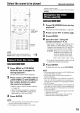
1 Press PLAY MODE repeatedly
to display "RANDOM" on the
display window on the main unit
while the disc is stopped.
• "RANDOM" will also be displayed on the TV
screen.
2 Press I_(play).
complete the program. Then, advance to
Step 3.
3 Press I_(play).
• To resume normal playback, press PLAY
MODE repeatedly to display "NORMAl" on
the display window on the main unit while
the disc is stopped. The program content
will not be erased.
• The following operations erase the program
content.
• Hold down CANCEL until "CLEAR!"
appears on the display window with the
program preference screen displayed (if
CANCEL is pressed and released
quickly, programs will be erased one by
one).
• Open the disc tray
• Turn off the power
• The same chapter or track will not be
played twice.
• To resume normal playback, press PLAY
MODE repeatedly to display "NORMAl" on
the display window on the main unit while
the disc is stopped.
• Random Playback will also be cancelled by
carrying out the following operations.
• Open the disc tray
• Turn off the power
• The previous track will not be returned to
even if I,<-.11is pressed repeatedly during
Random Playback (the beginning of the
current chapter or track will be returned to).
21