
Manual


Playingdiscs
_ _ _ _ (Refer to page 16 for playing MP3 and JPEG.)
- page 5
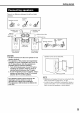
Place a disc with the label side
J .............................................facing up.
J • Place an 8 cm (31/8 inches)
disc in to the hollow part in
the center.
Press O/I AUDIO.
• The power will be turned on and the STANDBY
lamp will go off.
• Press O/IAUDIO again to turn off the power.
2 Press _OPEN/CLOSE to open the disc
tray to load a disc.
3 Press I_(play).
The disc tray will close and playback will start.
_-/11
• The power will be turned on when any of O,
_O_, 6 or Q on the main unit and _,
_ (_ or °PE_°s_, on the remote control is
pressed while the power is off.
If any button other than --Q or oP_osEis
pressed, the source will also be changed (if
there is a disc loaded, playback will start).
NOTE
• A menu screen may be displayed after starting
playback of a DVD. In this case, select a desired
item to playback by using the following buttons on
the remote control.
• Selecta desireditem using C3C_ _ (_ and
"xJ _/
press ENTER
• Select a desired item using the number buttons.
• Depending on the disc, actual operation may be
different from the description.
JVC
NOW READING
REGION CODE
ERROR!
NO DISC
OPEN
CLOSE
The following messages appear depending on the status of the system.
(When FM/AM or AUX is selected as a source, the messages do not appear.)
Appears when the system is reading the disc information. Wait for a while.
Appears when the Region Code of the DVD does not match the code the
system supports. (- page 3)
Appears when no disc is loaded.
Appears when opening the disc tray.
Appears when closing the disc tray.
12