
Manual


Getting started
TV
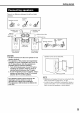
Supplied composite video cord Main unit
CAUTION
Connect the main unit directly with a TV (or a
monitor) without routing through a VCR.
Otherwise it may cause picture distortion while
playing.
Connecting directly
Also, when connecting the main unit to a TV with
a VCR built in, there may be picture distortion
while playing.
You can enjoy pictures of better quality using the
following cord instead of the supplied video cord.
Connecting by using the S-Video cord
TV S-Video cord
(sold separately)
S-VIDEO IN J Main unit
s _
Connectingbyusingthecomponentvideo
cord
You can enjoy better quality pictures than when
using the S-Video cord.
TV
/ Component video cord
(sold separately)
Main unit
CAUTION
Use one of either the S-Video cord or the
component video cord. If both cords are used,
pictures may not be played properly.
NOTE
• In order to enjoy pictures with Progressive mode
(. page 26), the TV is required to ha ve Progressive
video input•
• If the component video input jacks of your TV are
BNC type, use a plug adapter (not supplied) to
convert the plugs•
AC outlet
t Supplied power cord Main unit
_AC IN
• Connect the power cord after all other
connections are complete.
• The STANDBY lamp (on the front panel) will be
lit.
11