
User's Manual




45
5 Maintenance
T Press the ‘Start’ button again.
‘Empty coffee grounds container.’
T Empty the drip tray and coffee grounds container and put
them back into the machine.
‘Press the Rotary Switch.’, the Rotary Switch lights up.
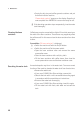
T Place one receptacle under the coffee spout and another
under the cappuccino frother.
k T Press the Rotary Switch.
‘Machine is being cleaned.’, water flows out of the coffee
spout.
The operation is interrupted,
‘Add cleaning tablet.’.
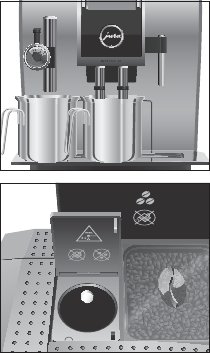
T Open the cover of the filler funnel for ground coffee.
T Insert a JURA cleaning tablet into the filler funnel.
T Close the cover of the filler funnel.
‘Press the Rotary Switch.’, the Rotary Switch lights up.
k T Press the Rotary Switch.
‘Machine is being cleaned.’, water flows repeatedly out of
the coffee spout and the cappuccino frother.
The operation is interrupted,
‘Empty coffee grounds
container.’
.
T Empty the drip tray and coffee grounds container and put
them back into the machine.
‘Please select product:’ appears on the display. Cleaning is
now complete. Your IMPRESSA is once more ready for use.