
User's Manual



20
2 Preparation
T Press the ‘Espresso’ button.
‘Coffee strength’ appears on the display.
g T Turn the Rotary Switch to adjust the coffee strength.
k T Press the Rotary Switch to confirm the setting.
‘Volume’/ ‘1.5 oz’ (45 ml) appears on the display.
g T Turn the Rotary Switch to adjust the fill volume.
k T Press the Rotary Switch to confirm the setting.
Preparation starts. The espresso is prepared using the
selected settings.
Preparation stops automatically.
‘Please select product:’
appears on the display.
Example:Proceed as follows to prepare a special coffee using the
product selector.
Precondition:
‘Please select product:’ is displayed.
T Place a cup under the cappuccino frother.
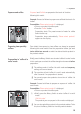
g T Turn the Rotary Switch to view the product selector.
g T Turn the Rotary Switch until the
‘Special coffee’ product is in
focus.
k T Press the Rotary Switch to start preparation.
Preparation starts. The preset amount of water for special
coffee flows into the cup.
Preparation stops automatically.
‘Please select product:’
appears on the display.
Your IMPRESSA can prepare a latte macchiato or cappuccino at the
touch of a button. There is no need to move the glass or cup.
Example:Proceed as follows to prepare one latte macchiato at the
touch of a button.
Precondition:
‘Please select product:’ is displayed. Milk is connected
to the cappuccino frother.
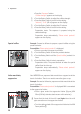
T Place a glass under the cappuccino frother (Figure: JURA
20 oz (0.6 liter) stainless steel vacuum milk container).
E Ensure that the level of the milk is no higher than the milk
pipe connection on the cappuccino frother.
T Turn the setting wheel of the cappuccino frother to the Milk
Foam position ü.
Special coffee
Latte macchiato,
cappuccino