
User Manual



4 Commissioning the instrument
16
4.4 Allocating user rights (enabling level)
The setting at the enabling level defines user rights which determine whether a parameter is shown at the operating
level, can be edited or is not shown at all.
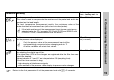
h Press for 3 seconds and appears.
h Set code 82 for accessing the enabling level using the and keys.
h Acknowledge with
Parameter and user right blink in alternation, e.g. .
h Use the and keys to set user right to , or .
h Acknowledge settings with .
h Set next parameter, see Overview of operation on the front inside page.
H
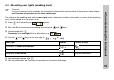
Time-out:
If no key is pressed for 60 seconds, the instrument automatically switches back to the process value display,
see Overview of operation on the front inside page.
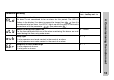
User right Display Factory setting
Parameter is shown and editable
Parameter is shown only -
Parameter is not shown all other parameters