
User Manual

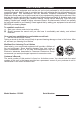


E7
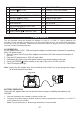
1
VOLUME CONTROL
11
SOURCE BUTTON
2
POWER BUTTON
12
TUNING CONTROL KNOB
3
MEMORY- BUTTON
13
CD DOOR OPEN
4 MEMORY+ / RANDOM PLAY BUTTON 14
5
REPEAT BUTTON
15
AUX IN JACK
6
FM STEREO INDICATOR
16
HEADPHONE JACK
7 LCD DISPLAY 17
BATTERY DOOR
8
PROGRAM/MEMORY BUTTON
18
DC IN JACK
9 STOP BUTTON
BUILT-IN HANDLE
10
PLAY/PAUSE / PAIR BUTTON
POWER SOURCE
This unit operates using the included AC Adaptor or using 6 x 1.5VDC “C” (UM-2) batteries (not
included). Do not attempt to operate the unit on any other power source. You could cause damage to
the unit and void your warranty. Please be sure the power outlet you plug this unit into is working and
receives constant (unswitched) power.
AC OPERATION
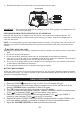
An AC Adaptor with 5V DC, 1000 mA output voltage is included and is required for operating
this in AC power mode”
1. Securely insert the DC plug of the adaptor cord into the DC Jack located on the back of
the unit.
2. Plug the AC Adaptor into a 120V AC wall outlet.
3. Connecting this unit to any other power source may cause damage to the unit.
4. Press the POWER button located on the top of the unit to turn the unit ON.
5. The LCD display will light.
Note: Unplug the AC adaptor from the unit and the wall outlet if you’re not going to be using it
for an extended period of time.
BATTERY OPERATION
Unplug the AC adapter from the wall and from the unit prior to installing the batteries (not
included).
1. Remove the battery door located on the back of the unit.
2. Following the polarity diagram located inside the battery compartment, install the 6 x 1.5VDC “C”
(UM-2) batteries (not included).
Note: For best performance, alkaline-type batteries are recommended.
DC 5V
1.2A
AUX IN
OPEN OPEN
REAR VIEW