
User`s guide






XE_BTP-06.ENG.MAN.manual.04.C
- 4 -
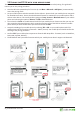
The BTP-06 needs to be connected to your mobile phone by a procedure called pairing. This guide will
instruct you in this pairing procedure:
Once the BTP-06 is powered up for rst me (or use
Menu > Bluetooth > Add phone
) it automacally
enters the pairing mode.
Set your mobile phone to be discoverable for the BTP-06 – please check your mobile phone user guide
for detailed instrucons. Ensure that the
Bluetooth funcon
is acvated on your mobile phone and vi-
sible to other devices. This usually involves going to a
Setup
,
Connect
or
Bluetooth
menu
on your mobile
phone and selecng the opon to
Discover
or
Add
a
Bluetooth
device.
Then select the
Search
on the BTP-06 and it will nd your mobile phone. Please note that you may see
also some other
Bluetooth
devices which are within working range of the BTP-06. Select the mobile
phone which you want the BTP-06 to pair with and choice the
Pair
.
Accept the PAIRing of your mobile phone by selecng
YES
or
OK
on your mobile phone and if the
mobile phone asks for a passkey or PIN enter “0000” (4 zeros). Your mobile phone should conrm the
nishing of the pairing procedure.
Conrm
YES
if your mobile phone requests to allow the BTP-06 proles - funcons (such as Handsfree,
DUN, IrMC, SyncML, PBA etc.).
The BTP-06 will warn you about funcons which your mobile phone doesn‘t support via Bluetooth.