
User`s guide





XE_BTP-06.ENG.MAN.manual.04.C
- 11 -
Call
- calls back the message sender
Details
- shows detail informaon about message sender and me
New...
- starts a new text message
Store number
- saves the message sender’s number in your phone book
Delete all
- deletes all messages in the current folder
To read previous incoming messages or to send messages, open the
Messages
menu by pressing and
select
Inbox
or
Sent
.
Do not connect the BTP-06 to the USB on your computer unl you have nished installing the
JabloTool soware from the CD!
The latest version of the installaon soware can be download at
www.jablotool.com/download.
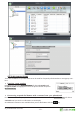
The most convenient way to set-up the BTP-06 and congure its parameters is by a and
the .
Load the installaon CD to your computer, start the and follow the program instrucons.
provides the most convenient way to set and operate all of the BTP-06 funcons and sengs.
It also has contact synchronizaon and Microso Outlook compability.