
User`s guide





XE_BTP-06.ENG.MAN.manual.04.C
- 9 -
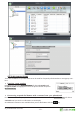
The BTP-06 can store up to 500 contacts for each paired mobile phone and
an addi onal 500 in the internal list.
First and Last name
Up to 3 phone numbers (Mobile, O ce and Home number)
Ring melody for this contact
Use the QWERTY keyboard and simply start to type the Last name of the contact you want to nd.
The BTP-06 will navigate through the contact list as you type.
Press the or select
Menu > Contacts
to browse the contact list. Use the and to
move within the list. Use to search the list. Press open
the
Options
menu for the selected contact.
Press the
or use the
Call
command from the
Options
menu to call the
selected contact.
Use the
Send SMS
command from the
Options
menu to write
an SMS for the selected contact.
Press the or use the
Details
context op on to see the details of the contact.
Please note that the following edit opera ons are available for internal contacts only.
Use the
Add new...
command from the
Options
menu to add a new contact.
Use the
Edit
command from
the Options
menu to open contact editor.
Press the or use the
Delete
command from the
Options
menu to delete a selected contact.
Use the
Delete all
command to delete all contacts.
The BTP-06 automa cally synchronizes the contacts in your mobile phone – when your mobile phone
comes within working range of the
Bluetooth
radio. The BTP-06 starts to update the contacts (contacts are
copied from your mobile phone to the internal memory of the BTP-06). This can take some me, depending
of the type of synchroniza on your mobile phone supports. The synchroniza on process is indicated by an
icon on the LCD.
Please note that the BTP-06 only READS data from your mobile phone’s memory. To prevent any
possible unwanted changes in your mobile phone, the BTP-06 never writes anything to your
mobile phone‘s memory.
To perserve your mobile phone ba ery, the automa c synchroniza on will not be run more frequently
than once a hour.
If you wish to apply the most recent changes of your mobile phone contacts to the BTP-06, go to the con-
tact list and select
<Synchronize now>
to ac vate the synchroniza on manually.