
User's Manual




6 LEVELING
and Calibration
61
(4) Failure of printing caused by error in auto leveling.
NOTE:
• Before the leveling, press the four magnet blocks with hand to make them be fully seated in the
magnet holes of the hot bed, so as to exclude the gaps between them;
• The residual material on nozzle cusp should be cleared before leveling;
• Before leveling, the printing buildplate should be cleaned up without any printed piece, large piece
of glue or other foreign matter remained on it;
• Before leveling, the chamber should be cleaned up to prevent a collision when the buildplate is
being lowered;
• Be careful to prevent scald in operations as the nozzle is in high temperature during the leveling.
6.2.2 Z calibration
Completely consistent with the Z calibration in manual leveling, refer to 6.1.2.
6.2.3 XY calibration
Completely consistent with the XY calibration in manual leveling, refer to 6.1.3.
6.3 Calibration of Material Weight
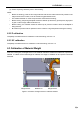
As shown in the figure, the weight sensor in the material chamber is loaded with material roll, spooler and
material. To obtain the accurate weight of material, the weight of material roll and spooler should be
deducted.
Figure 6. 5 Position of weight sensor in material chamber
Weight sensor Weight sensor
Material roll