
User's Manual






5 PRINTER OPERATION
40
operation.
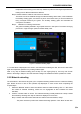
Step 2: Please wait…The nozzle is heating…
Firstly, the printer will heat the nozzle for material unloading. Wait until the nozzle is
heated to the material unloading temperature before turning to the next step.
Step 3: Please wait…The material is retracting…
After reaching the unloading temperature, the material will be retracted continuously in
high speed.
Step 4: Retracting completed. Please take out the material.
The material retracting process continues about 90s.
3. Open the material chamber, take out the consumable coil, and wind the retracted filament in over
2 meters long on the material coil. To prevent such coil of material from snarling in next time of
use, pleas be sure to insert one end of the material into the small hole in the side of the material
coil.
4. Close the top door of the material chamber to protect against moisture.
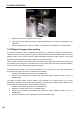
5.2.3 Material editing
Figure 5. 7 Material editing interface
5.2.3.1 Change the material parameters
Click "Material" button, and then select the material editing button at the bottom right corner to turn to the
material editing interface. Following processing parameters of the material can be edited:
Nozzle T (℃): Temperature of the nozzle for material loading.
Buildplate T (℃): Temperature of the printing buildplate for preheating and heat maintaining.
Chamber T (℃): Temperature of the chamber for preheating and heat maintaining.
Preheat Time (min): Time of buildplate and chamber preheating before printing.
Density (g/cm3): Density of the material.
MAT. chamber (℃): Temperature of the heating filament chamber.
Unload T (℃): Temperature of the nozzle for material unloading.
Maintain Buildplate T (℃): Temperature of the buildplate to be maintained after the completion of printing.
Maintain Chamber T (℃): Temperature of the chamber to be maintained after the completion of printing.
Note: The material processing parameters here are only used for the operations on the printer other than
the formal printing, where the operations on the printer include material loading, material unloading,
leveling, XY calibration, Z calibration, preheating, heat maintaining, etc. In the process of formal printing,
the loaded G-code directive files will be loaded, and the preset parameters in the printer will not be
executed any more.
Steps to change the material parameters are as below:
1. Click the material whose parameters are to be changed. At this time, such material line will be
highlighted.