
User's Manual






5 PRINTER OPERATION
37
5.1.2 Power off the printer
To power off the printer:
Press the power button on the front side of the printer (same button for power-on).
Please note: this operation only shut down this printer. To completely power off the printer, it must turn the
power master switch to the OFF (O) position.
!For long-term idleness of the printer, please disconnect the AC power supply connection of the
power cable.
5.2 Material, Material Chamber and Nozzle
Note: In material loading and unloading operation, please ensure that there is no printed piece or other
object on the printing buildplate. This is because XYZ axis will execute the zero returning in these
operations. Print piece or other object on printing buildplate will collide with the nozzle or X cross beam.
Material chamber of the printer contains two bins, which can accommodate 1 roll of material for left and
right nozzle respectively. Left bin supplies to the printing on left nozzle, which is mainly the printing of
model material, while the right bin supplies to the printing on right nozzle, which is mainly the printing of
support material. To execute the parts printing, the left and right bin must be installed with material in any
case.
5.2.1 Material loading
The information in this section will guide you to complete loading material to the nozzle. Please be sure to
refer to the operation tips displayed on touch screen when completing the required steps.
1. The material chamber is located at the lower part of the printer, which will pop up via the guideway
by gently pushing the material chamber forward;
2. Push the transparent top door of the material chamber forward to open the material chamber;
Figure 5. 3 Material chamber
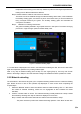
3. On the screen operation interface, select the “Material” button to enter the interface similar to the
following figure. Click “L”/ “R” to select the nozzle for material loading, where the icon highlighted
as blue indicates the nozzle activated;
4. In the pull-down menu of “Material”, select the type of material to be loaded. (If the material to be