
User's Manual




4 USER INTERFACE
34
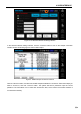
Figure 4. 29 Interface after a wireless network is connected successfully
As shown in following figure, select DHCP IP address, and then click "Set IP" button to obtain the dynamic
IP address. Alternatively, select Static IP address for static IP mode, and then manually input the IP
address to configure as static IP.
Figure 4. 30 Wireless network dynamic IP address configured successfully
After successful configuration, user may also click "Ping" button, select the target IP address and make
Ping test to verify the successful connection.
Note: It is default to ping the gateway address. If no gateway is set in the local network, it is required to
change to other valid address for test.