
User's Manual




4 USER INTERFACE
28
4.5.1 Nozzle setting area
The nozzle setting area is shown as following figure. Click the nozzle icon to switch current nozzle. The
nozzle setting area is available for material selection, nozzle temperature setting, material
loading/unloading (refer to Chapter 5) and other related operations. Click the "Auto leveling and
calibration button" to turn to the auto leveling and calibration interface (refer to Chapter 5). Click the
"Manual leveling and calibration button" to turn to the manual leveling and calibration interface (refer to
Chapter 5). Click the "Material database management button" to turn to the material database
management interface.
Figure 4. 19 Nozzle setting area
4.5.1 Material management interface
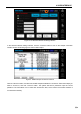
The material management interface shown as following figure is used to browse the system material
database, and customize the user material database.
Figure 4. 20 Material database management interface