
User's Manual




4 USER INTERFACE
25
Figure 4. 12 Control area
In the system setting interface, if the Developer mode is enabled,
Figure 4. 13 Enable developer mode
The control area will be extended to following form:
Figure 4. 14 Control area under developer mode
Click the status gear to display/hide the command input box.
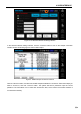
Check the log check box to display and open the Log display area.
Figure 4. 15 Log display area
Log display can be used for auxiliary default diagnosis.
Note: In the process of printing, please uncheck the Enable log, otherwise the printing speed and quality