
User's Manual




3 SYSTEM COMPONENTS
12
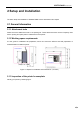
Figure 3.2 Rear view of the printer
3.2 Top Door Subassembly
By pushing up the top door, the printing state can be observed, and it is also convenient for the
maintenance of XY rack and printing head component.
Release the electromagnetic lock to push up the top door, where the top door is supported by air spring.
Where the opening angle is greater than the critical angle, the support moment of air spring will be greater
than the gravity moment of the top door, which can keep the top door in its opening position. Where the
opening angle of the top door is less than the critical angle, the air spring does not have sufficient support
moment yet, and the top door will fall down freely. Therefore, when opening the top door, please note to
not release your hand when the door opening angle is less than the critical angle, and release hand when
you feel the top door is supported by sufficient force from the air spring.
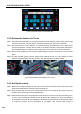
The user interaction area is under the top door, including the touch screen, USB interface, button switch.
Users can control the printed piece and obtain the information about machine state through the touch
screen. The USB on the left side is onlyused for printingviacomputer.
The USB on the right side is used for printing by plugging in USB flash disk. The button switch is used for
normal switching on and off, and emergency shutdown.
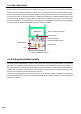
Caster
Mounting screw
Left lateral plate
Back lateral plate
Power interface / Switch
Liquid observation
window