
User's Manual




2 SETUP AND
Installation
7
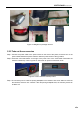
Figure 2.3 Diagram for package removal
2.2.2 Take out the accessories
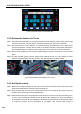
Step 1: Connect the power cable to the power socket on the back of the printer, and then turn on the
power switch besides the power socket to make the power switch in ON (I) position;
Step 2: Press the round start button on the right of the panel. Turn to the screensaver mode after the
machine is started up. Click any place on the screen to quit the screensaver mode.
Figure 2.4 Power switch and startup button
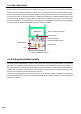
Step 3: The accessory box is under the printing buildplate in the chamber. Click "Axis" button to enter into
the interface, and then click "Home Z". After the printing buildplate rises, all accessory boxes can
be taken out.